
Monthly YTD Turnover Statistics Report
Debtors >Reports >Report list
Monthly YTD Turnover Statistics Report. Grouped By Region, Division or Sales Rep.
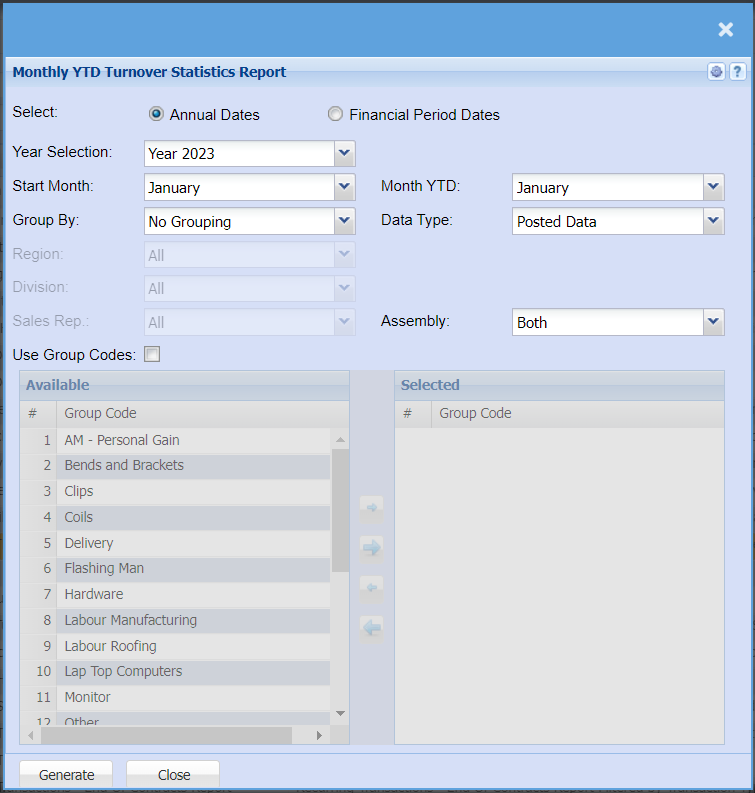
| Select | Select if you want your report to be pulled using annual dates (January - December) or Financial Year Dates (April - March) |
| Year Selection | Select the financial year you are wanting to pull a report for. |
| Start Month | Choose the month you want to run your report from |
| Month YTD | Choose the month you want to run your report up to. |
| Group By | Select from the drop-down menu if you want to pull your report by a specific group, you can choose from No Grouping, Region, Division or Sales Rep. |
| Region | You can pull the report for all your debtors, or you can select a specific Region from the drop-down menu if you have set up Regions for your debtors. |
| Division | If you have set up divisions for your debtors, you can pull the report for all your debtors or you can select a specific Division from the drop-down menu. |
| Sales Rep | If you want to run a report by a specific sales rep, then you will need to select the sales rep on the drop-down menu. If you leave the sales rep on all the report will run by all sales rep. |
| Use Group Codes | If you have group codes, you can tick the Use Group Codes box if you want to pull a report for specific inventory group or multiple thereof, if you want to pull a report for all items you can leave this box unticked. |
| Data Type | Select if you want Posted Data or Static Data |
| Assembly | If you run jobs through an assembly line, you can choose to filter for only those jobs or you can choose to exclude those jobs or pull a report that will have all jobs. |
No Comments