
Debtors Contacts Report
Debtors> Reports> Report list
List of either Debtor, Prospects or Opportunities plus their respective contracts listed per Debtor, Prospects or Opportunities. This report can also be selected for All debtor types.
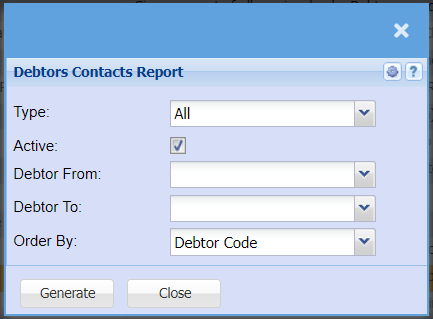
Report on list of Debtors, Prospects or opportunity
| Type | Select the type of contacts you would like to pull a report for from the drop-down menu, you can choose form Prospects, Debtors or Opportunities. |
| Active | By Ticking the Active box, the report will only generate active debtors contacts only |
| Debtor From / Debtor To | Select a Customer/Debtor you wish to view the report from. Select the Customer/Debtor you wish to see up to in the report. |
| Order By | Select how you would like your report to be order by from the drop-down menu, you can choose from Debtors code or Debtors name. |
| Generate button | Click the "Generate" button to open the report. You will have options to copy, email, or print the report. To view the report in an Excel document, copy the report and paste it into an Excel file. |
No Comments