
Customer Price List
Debtors> Reports> Report List
Gives a report on price levels in the system which can be sent to a customer
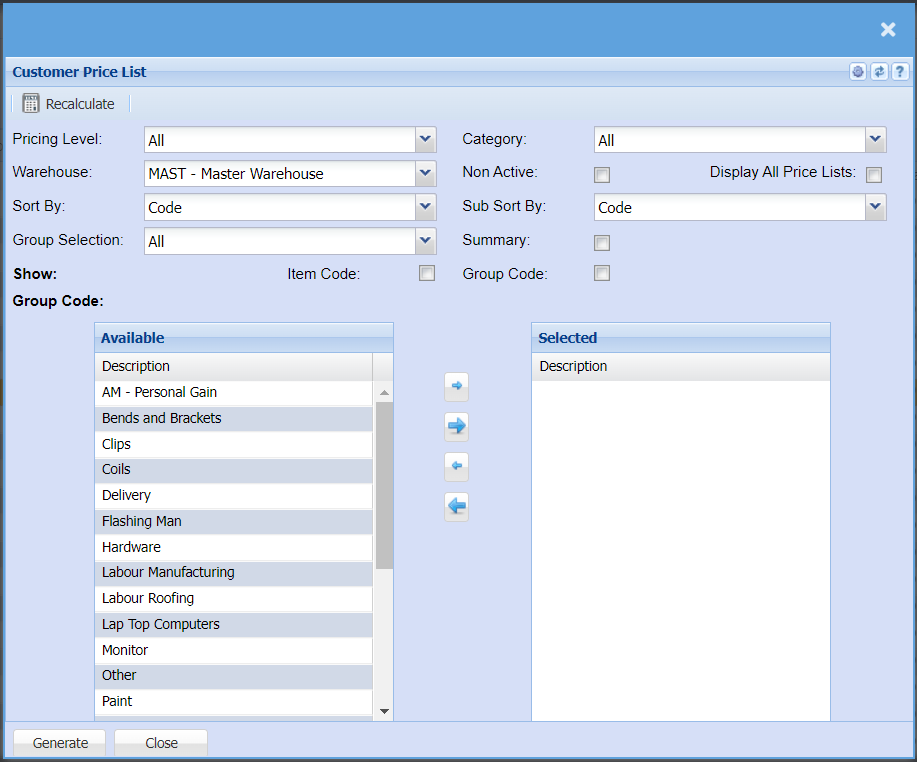
| Recalculate | You can update cost prices of your inventory items by clicking the Recalculate button |
| Pricing Level | If you have different pricing levels that apply during different in and out of seasons or if you have special pricing structures, you can select this from the drop-down menu to refine your report |
| Warehouse | Here you can select a specific warehouse you would like to pull the report for should have multiple warehouses |
| Sort By | Select a sort criteria on the drop-down menu |
| Group Selection | |
| Category | |
| Non-Active Tick | This option will allow you to include inactive items on the report when selected |
| Display All Price Lists Tick | |
| Sub Sort By | Sub Sort the report by selecting one option from the drop-down menu allows the user to pull a report with a secondary criteria that will be sorted by either, Code, Description, Warehouse or Bin location. |
| Summary | If you put the tick on the report will only pull limited information |
| Item Code Tick | You can apply the tick if you are wanting to report to be pulled using your item codes |
| Group Code Tick | You can apply the tick if you are wanting to report to be pulled using your item group codes |
No Comments