
Debtors Group Summary Report
Debtors >Reports >Report list
This report gives invoices, less credit notes per debtor, spread over the number of financial months indicated on the criteria given in the table form.
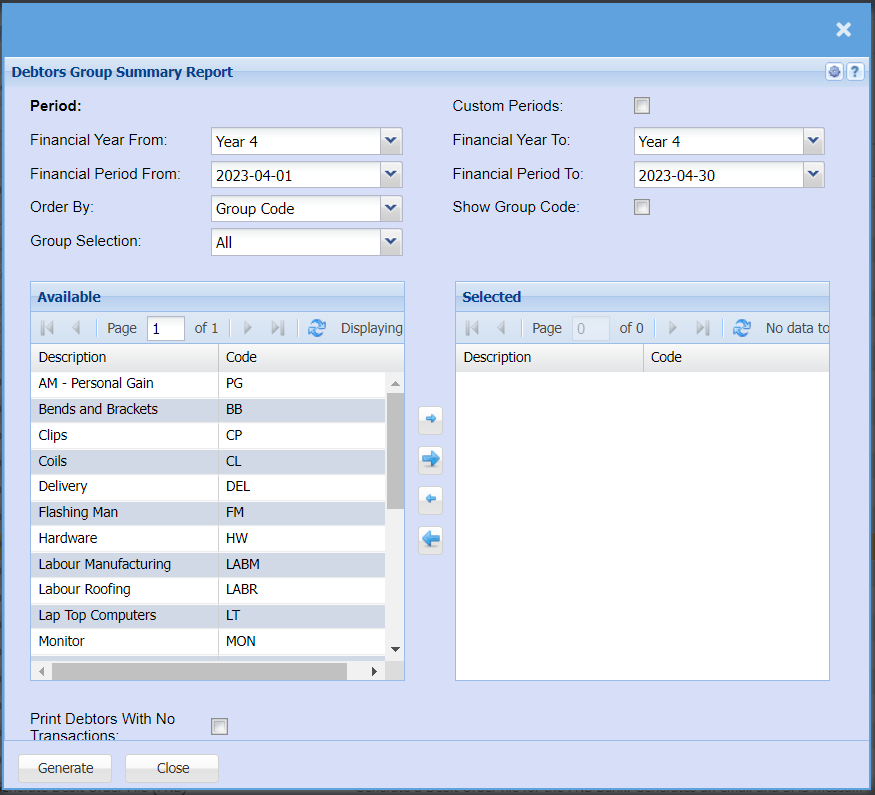
The report that runs according to invoices less credit notes per group code
| Financial Year From / Financial Year To | Select the year From and To from the drop-down menu that you would like to pull the report for |
| Financial Period From / Financial Period To | Select the period From and To from the drop-down menu that you would like to pull the report for |
| Order By | Select how you would like your report to be order by from the drop-down menu, you can choose from Debtors code or Debtors name. |
| Group Selection | If you have set up groups for your Inventory you can choose to refine your report by selecting a group on the drop-down menu |
| Custom Periods Tick | If you tick custom period, you will be able to use any date to pull a report for. |
| Show Group Code Tick | If you tick Show Group Codes, this will add a column to your report with showing the group codes. |
| Print Debtors With No Transactions Tick | By ticking this box all your debtors who do not have any transactions for the time period you are pulling the report for will still be pulled for the report |
No Comments