
Quote Report
Debtors >Reports >Report list
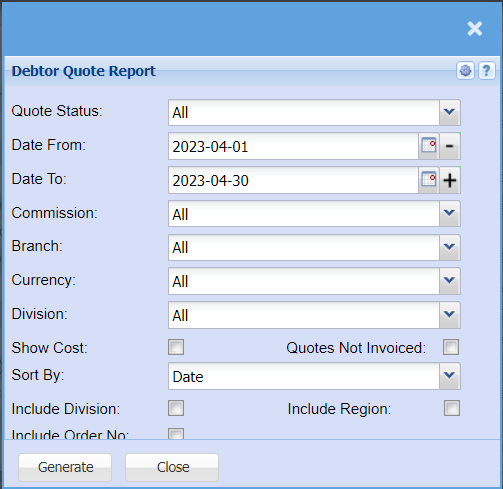
Gives a report of all quotes in different status levels with dates and values on each quote.
This is how a debtor is selected by using the long search
| Quote Status | Select from the drop-down menu which statuses of Quotes you want to pull a report for, this could be Approved quotes, Cancelled Quotes, quotes that are still in Preparation stage or rejected quotes etc. |
| Date From / Date To | Choose the date range for which you want to view the report from / Select a date range of when you want to see up to on the report. |
| Commission | Select from the drop-down menu if you want to pull the Quote report for a specific Sales Rep. |
| Branch | If you have more than one branch, you can pull a report per branch by selecting the branch from the drop-down menu. |
| Currency | If you operation with multi-currency you can pull a report for all currencies or you can select a specific currency. |
| Division | If you have set up divisions for your debtors, you can pull the report for all your debtors or you can select a specific Division from the drop-down menu. |
| Show Cost | Tick the box if you want to have the costs shown on the quote report. |
| Quotes Not Invoiced | |
| Sort By | Choose from the drop-down menu how you would like your report sorted, your options are by date or quote number |
| Include Division | If you have Divisions set up, you can pull a report for all divisions combined or for a specific division. |
| Include Region | If you have Regions set up, you can pull a report for all regions combined or for a specific division. |
| Include Order No | Tick the box if you would like to include customer purchase orders on the report. |
No Comments