
Invoices By Date
Debtors >Reports >Report list
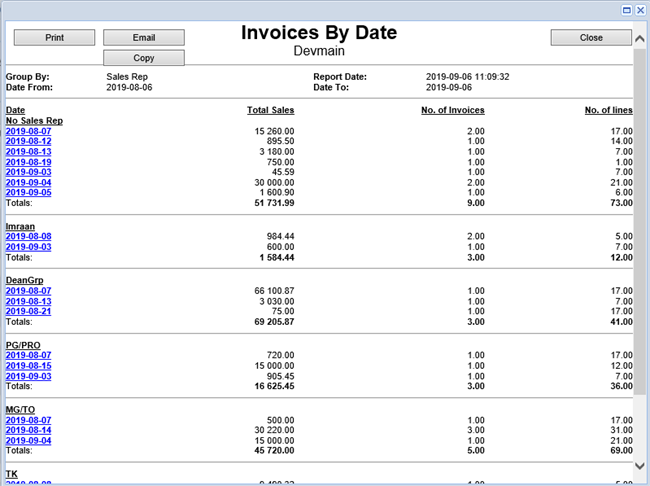
Shows summary of invoices and credit notes by rep or date, also is an inter-branch report for invoices.
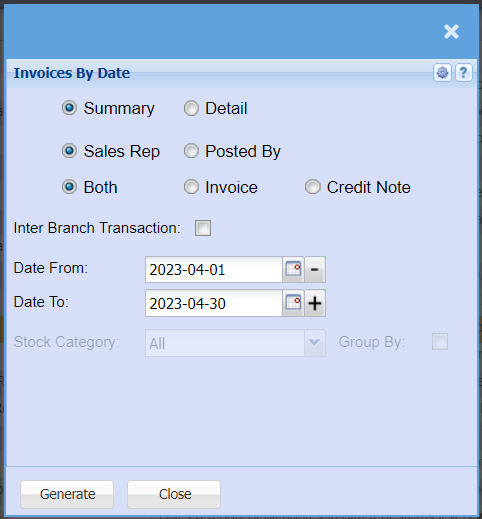
| Summary | Click on Summary if you want a report with limited information |
| Detail | Click on Detail if you want a report with more information |
| Sales Rep | Click on Sales Rep if you want this added as a column to your report |
| Posted By | Click on Posted by if you want this added as a column to your report |
| Both | Click on Both if you want invoices and Credit notes added as a column to your report |
| Invoice | Click on Invoice if you want Only invoices added as a column to your report |
| Credit Note | Click on Credit Note if you want Only Credit Notes added as a column to your report |
| Inter Branch Transaction | Tick this box if you would like inter branch transactions added to your report |
| Date From / Date To | Choose the date range for which you want to view the report from / Select a date range of when you want to see up to on the report. |
| Stock Category | Select a Stock Category from the drop-down menu that you want to pull the report for |
| Group By | Tick this box if you want the report grouped by Caragory. |
No Comments