
Recurring Sales Report
Debtors >Reports >Report list
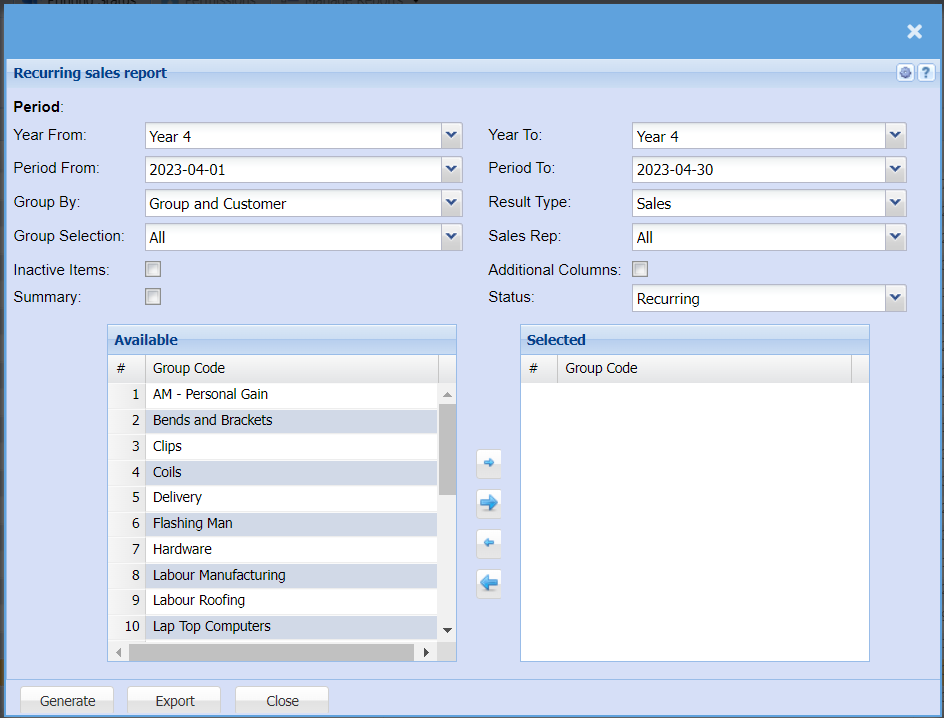
| Year From / Year To | Select the year From and Year To Dates from the drop-down menus will show results specific to the period you have selected. |
| Period From / Period To | Select the from and to period for your report. The From Period will always be the first of the month you select and the To Period will always be the last day of that month. |
| Group By | Select from the drop-down menu if you want to pull your report by a specific group, you can choose from No Grouping, Region, Division or Sales Rep. |
| Group Selection | |
| Inactive Items | Tick the box if you would like to include Inactive Items in your report |
| Summary | If you put the tick on the report will only pull limited information |
| Result Type | Select a result type from the drop-down menu, select from Sales, Cost, Profit, Qty or Sales and Quantity. |
| Sales Rep | If you want to run a report by a specific sales rep, then you will need to select the sales rep on the drop-down menu. If you leave the sales rep on all the report will run by all sales rep. |
| Additional Columns | |
| Status | If you select all the report will pull all statuses. If you want to view report by status, select the status on the drop-down menu |
No Comments