
Locations
Locations are linked to a warehouse
Locations have a unique code across all warehouses. This adds value when you want to scan a location, it will give you the warehouse that it is linked to.
There is Always one location setup per warehouse which is the default (system Location)
A hotfix will be created and run to update all existing warehouses with at least one location for each.
This system location cannot be deleted or made inactive. One can change the code or description, but not remove as it is linked to the warehouse.
Warehouse setup
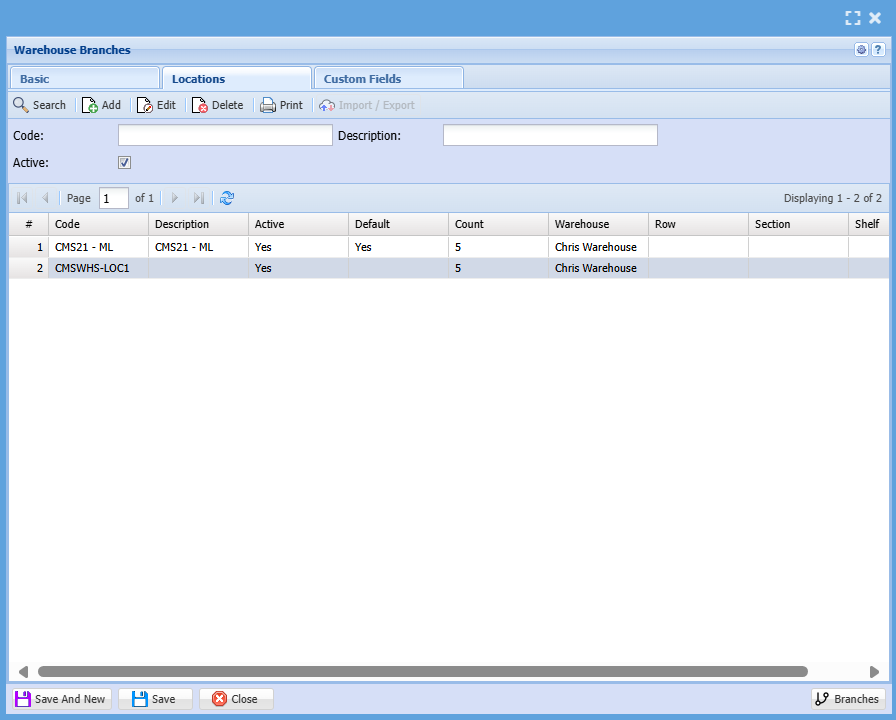
| Location Code | Code of the location which is unique across all warehouses |
| Location Description | Description of Location |
| Active |
Shows that the location is active A location cannot become inactive if it has items assigned to it |
| Default | Shows which location is the default |
| Count | Shows how many products are linked in this location |
Add or edit a location

| Location Code |
Unique number |
| Location Description | Description of location |
| Warehouse Linked | Name of Location (Only name) |
| System Warehouse | Informs the user that this Location cannot be deleted or made inactive |
| Active |
Tick to make inactive Can only be made inactive if no items are linked to the location System Linked warehouse locations cannot be made inactive |
| WHS | Inserts the Warehouse code here but user can change |
| Row | User can enter a row value |
| Section | User can enter a Section value |
| Shelf | User can enter a shelf value |
| Seperator |
Allows the user to use a separator when creating the code from WHS + Row + Section + Shelf Default is None (other values are Space or - or | or \ or / ) |
| Make Code button | When clicking on this, it will make a code based on WHS, Row, Section and Shelf |
No Comments