
Warehouse Setup
Multi-warehouse is a separate sub-module of Huge ERP.
Multi-warehouse allows one to put stock in multiple warehouses.
Multi-warehouse allows one to transfer stock from one warehouse to another.
Take stock control and stock takes on each warehouse.
Allows one to GRV stock into a specific warehouse and sell from another warehouse
Multi-Warehouse is also used for consignment stock.
This sub-module resides in the main inventory module.
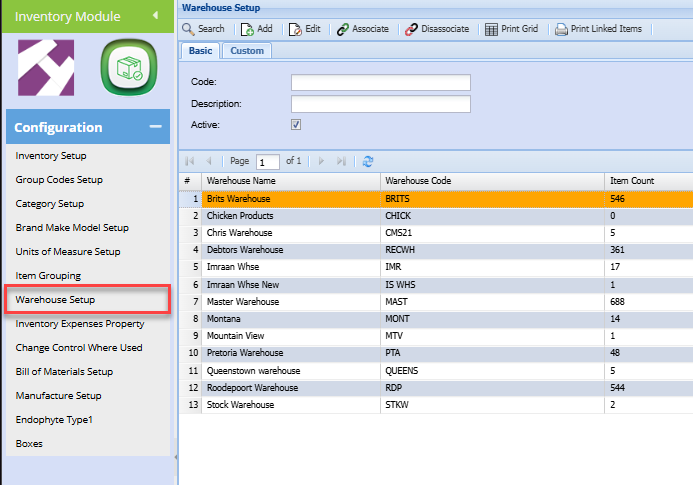
| Search |
Allows you to search for a specific warehouse If you don't put any information on the search criteria the search button will recall all warehouse |
| Add | Add allows you to create a new warehouse |
| Edit | Allows you to edit an existing warehouse |
| Associate | Allows you to link all stock items to a warehouse |
| Disassociate | Allows you to delink all stock items to a warehouse |
| Print Grid | Allows you to print information that is displayed on the grid |
| Print Linked Items |
Allows you to print items linked to a specific warehouse For you to be able to see linked items you first need to highlight a warehouse you want to see linked items for |
When you click add or edit the screen below will be displayed:

| Code | Enter the warehouse's unique code |
| Description | Enter the warehouse description or name |
| Active | Leave a tick on if the warehouse is active |
| Location | |
| Shopify ID | Add a warehouse Shopify ID if you have Shopify integration |
| Sync Mobile | This tick allows for a warehouse to be linked to Webatar mobile app |
| Incl In Below Min Report | Put a tick on if you want the warehouse to be displayed on the below minimum report |
Locations Tab are where all the boxes are stored
No Comments