
Advanced Unit of Measure Setup
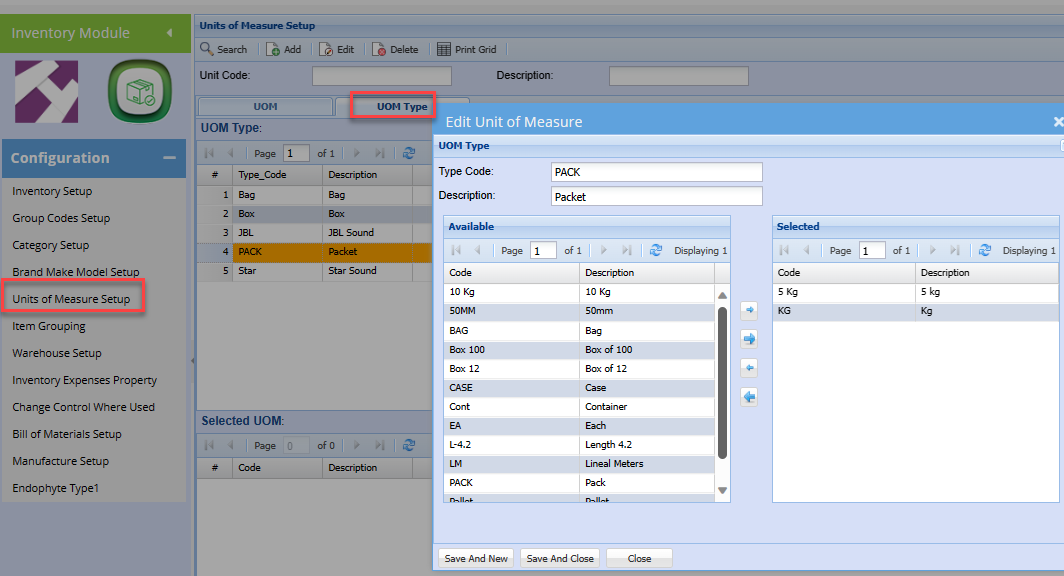
The advance Unit of Measure setup caters for linking multiple units of measure to a UOM type.
one could for instance sell the same product but in various pack sizes
example: Grain could be sold in 1Kg, 2Kg or 5Kg packets
In which case the UOM Type could be packets, and you then link the various packet sizes to the packets.
To setup UOM Type:
Inventory Module > Configuration> Unit of Measure Setup
Add the individual pack unit of measure as shown in the Basic Unit of Measure setup section.
Click the UOM Type Tab
Click Add
Enter a Code.
Enter the Description.
Click Save and Close
Edit the new UOM type created.
Select the respective unit of measure to be linked to this UOM type.
No Comments