
Debtor Collections
The collections is a schedule of outstanding debtors
the collections schedule allows one to enter notes on correspondence with clients that have monies due
to create a collections schedule go to:
Debtors Module> Reports >Age analysis
Serach the period you wish to see outstanding debtors for.
Click the Collections button

Enter a code
Enter a description
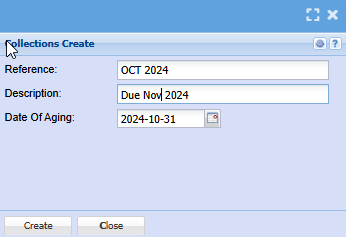
Click the Create button
Then go to Activity
Collections
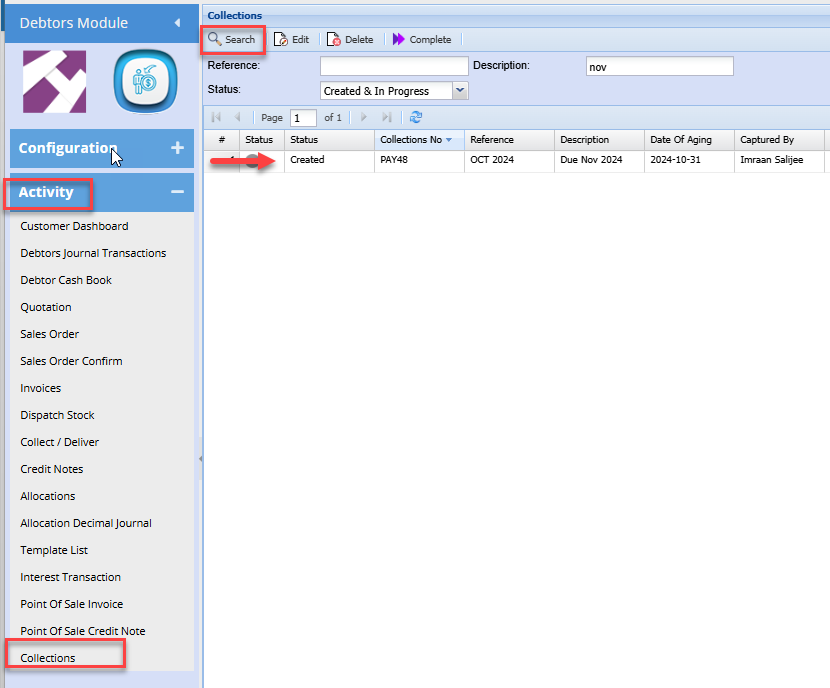
You will note your collections schedule has been created
Double click to open the collections list

| Complete | Marks the schedule as complete and removes it from the grid. You will need to tick the select tick box and then the collected button |
| Debtor History | Displays the selected debtors' transaction history over the given date range |
| Collected | Marks the selected line as collected and hides it from the schedule |
| Delete Line | Deletes the selected line from the grid |
| Remove paging | Displays all debtors on a single page If the debtors list exceeds the default 100 lines |
| Show All lines | Displays all debtor lines including the hidden lines that have been marked as collected |
| Promised Amount | Enter the amount the debtor promised to pay |
| Promised Date | Enter the date the debtor promised to pay |
| Comments | Enter any comments or notes from correspondence with respective debtor |
| Paid Amount | Enter the amount paid |
| Paid Date | Enter the paid date |
No Comments