
Add Debtors Interest Journals
This utility will calculate and create a Debtor Journal for each debtor that is Checked to have interest charges against them for outstanding balances.
The interest is calculated per age period per debtor for the outstanding amount per age period.
The interest percentage is setup on the Debtor Master Detail window.
Debtors> Activity> Interest Transactions> Add
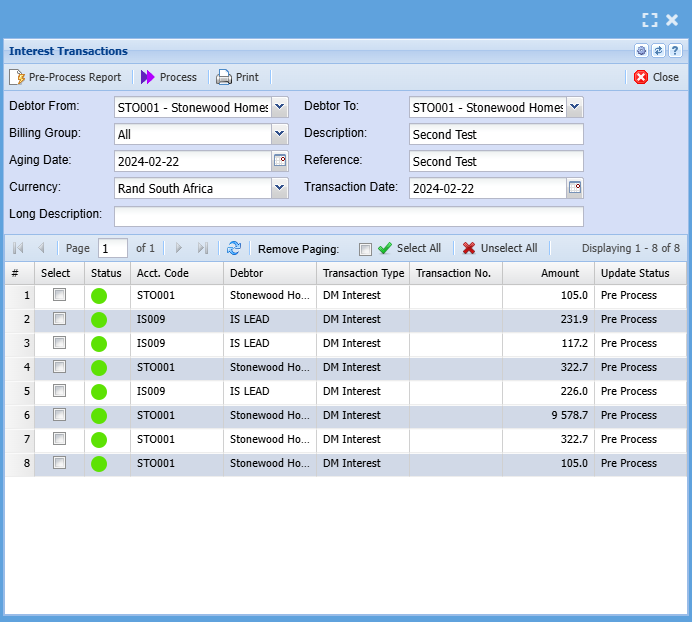
|
Debtor From |
Select the from debtor. (The From and to can be left blank to include all debtors) |
|
Debtor To |
Select the To debtor. |
|
Billing Group |
A selectable value from a dropdown to create journals for a specific debtor billing group. |
|
Aging Date |
This is the date that the aging for the debtors will be based on. |
|
Description |
Enter a description for you interest batch. e.g. Interest on overdue account |
|
Currency |
Select the currency from the drop down. |
|
Reference |
Enter a reference of your choice.eg, Interest on Overdue Account. This is the reference that will appear on your interest transaction line on the debtors statement |
|
Transaction Date |
This is the actual transaction date for the debtor journal. |
|
Long Description |
Enter a description regarding the interest journal. |
|
Standard Tab has four buttons |
|
|
Pre-Process Report |
Pre-process runs the journal calculations but does not process the actual transaction, this allows for assessment and scrutiny before actually processing the interest journals. |
|
Process |
Actually run debtors interest utility. |
|
Close button |
Closes the window. |
|
Print button |
Print debtor’s interest run report |
Preview interest run
.png)
If the amounts are not correct, you can close and amend the relevant parameters such date, Interest Rate, etc. and rerun the interest calculations.
Note: If you click “Process” This will post the interest transaction to the respective debtor's accounts. Typically, you will only Process these transactions on month end, prior to running the debtor's statements and if you are satisfied that the interest amounts are correct.
If you process and there is an error in a particular calculation, you will need to do a journal to correct the mistakes.
Interest Calculation Example
Assume you wish to charge ABC Stores interest of 10% on their outstanding account.
Using the interest setup of 10%, Zero Minimum amount, Period From 30 Days.
| Debtor From | ABC Stores |
| Debtor To | ABC Stores |
| Billing Group | |
| All Description | Interest on overdue account |
| Ageing Date | 30/04/2012 |
| Reference | Interest on overdue account |
| Currency | Rands |
| Transaction Date | 30/04/2012 |
| 180days | 150days | 120days | 90days | 60days | 30days | Current | Balance |
| 0 | 0 | 0 | 1200 | 1000 | 500 | 0 | 2700 |
30/04/2012 Interest calculations:
Current: 31/01/2012 to 29/02/2012 Interest not applicable – zero balance
30 Days:01/03/2012 to 31/03/2012 Interest = R 0.00 (Due to From Period set at 30days)
60 Days: 01/04/2012 to 30/04/2012 Interest = R 8.33(1000 * 10%) / 12
90 Days:
Therefore on 30/04/2012 the ABC stores account will reflect a journal of R 8.32 for the interest calculate from 30-60days.
| Debtors Account | Dr | Cr | Balance |
| 01/04/2012 Opening Balance | 1000.00 | 1000.00 | |
| 30/04/2012 Interest on overdue account | 8.33 | 1008.33 |
No Comments