
Purchase Order Shipping Tab
The shipping Tab is related to the delivery of goods
To ship goods go to:
Creditors/ Suppliers Module> Activity> Purchase Order> Shipping Tab
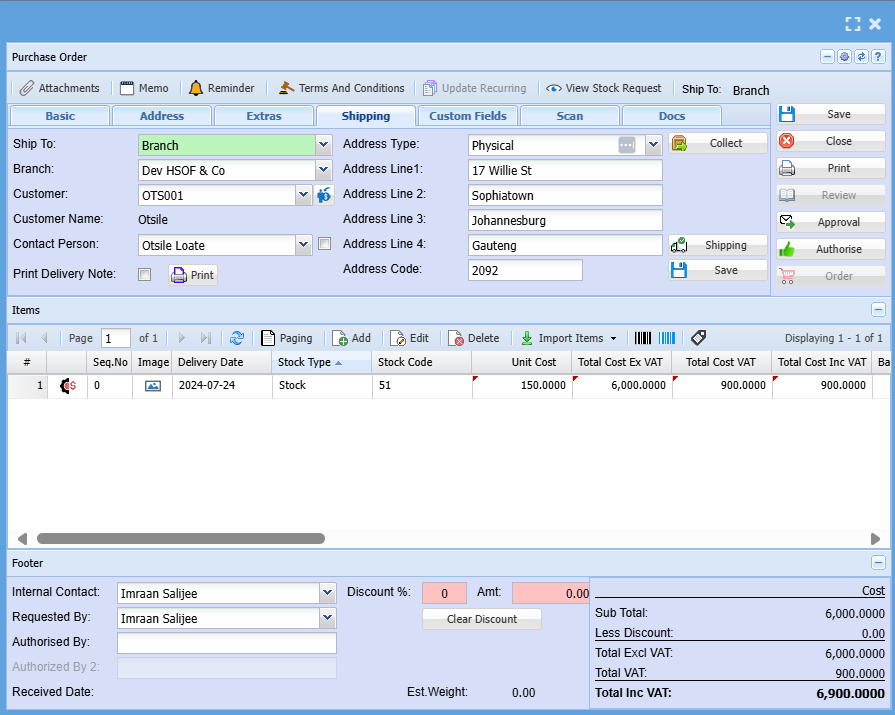
| Ship To | Select where you want to ship the parcel to on the drop down menu selection |
| Branch | Select Branch on the drop down |
| Customer | Select a customer you want to ship parcels to on the drop down |
| Customer Name | Customer name will be automatically populated |
| Contact Person | Select the contact person on the drop down |
| Print Delivery Note | This button allows you to print a delivery note |
| Delivery Type | select the destination address where the goods should be delivered |
| Collect | This a new button added which allows automatic collection for customers who want to collect the goods instead of having them delivered |
| Shipping | This is where you add all shipment information and instructions |
No Comments