
Delivery Note Process
Creditors Module>Activity> Delivery Note processing
Delivery note process is where a company can receive stock into the system with a delivery note and without a supplier invoice.
When completing the receive stock quantities, select the Delivery note option on complete
.png)
Click Ok.
.png)
The Purchase Order will now move to the 'delivery note' menu item.
For quick search use the basic search field tab and search using - Use the delivery note number, or Purchase Order Number, Or Reference
Enter the details and click search
.png)
After the receive stock has been completed, the document will change status to Delivery note, where one can match the Delivery note to the actual supplier invoice.
Should there be any changes to the delivery note price to the supplier price, one can amend and change the price of the items.
Only price changes can be made, quantities cannot be changed.
Amending the price of an item, changing the price from a unit cost of 10.00 to a unit cost of 15.00, that means an increase in price change of 5.00. This change will update the ledger account called Cost Price Variance.
The Delivery note can be processed.
Two things will happen.
GRV will be created, processed and the delivery note general ledger account is balanced
General Ledger postings for Delivery Note
There are two stages to the General Ledger postings for Delivery note to Supplier Invoice (GRV)
When stock is received without the supplier invoice, one can receive the stock into the system.
The cost price of the stock will be based on the Purchase Order value.
VAT / GST is not taken into account until the supplier invoice is captured.
The creditors delivery note value is the potential value owed to a supplier based on goods received without an invoice.
See ledger accounts updated.
| Account | Debit | Credit |
| Creditors Delivery Note | 50.00 | |
| Stock control account | 50 |
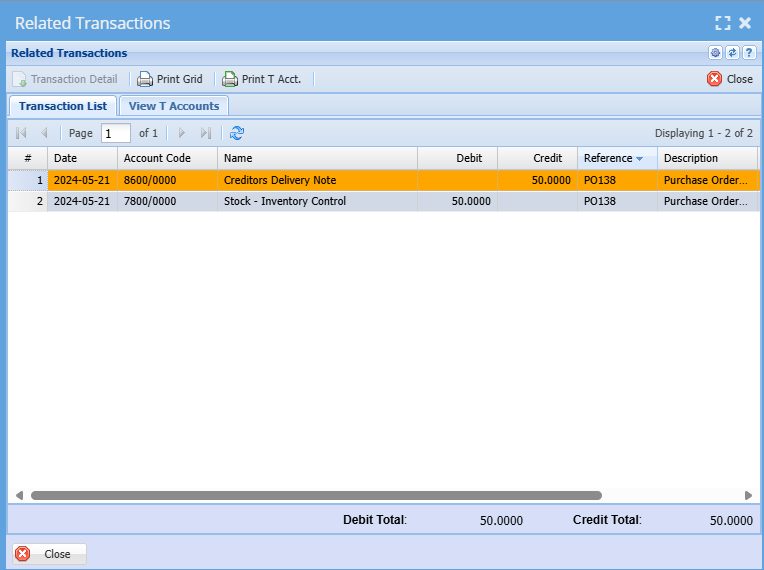
When the invoice is received, check the invoice against the value of the purchase order. If there is a difference capture the value difference in the delivery note confirmation screen.
Process the delivery note to a supplier Invoice (GRV).
After you have processed the delivery note, the amount will appear on your Creditors age analysis.
The cost price variance account will only update IF the value between the purchase order and the supplier invoice are different.
See ledger accounts updated.
| Account | Debit | Credit |
| Creditors Control Account | 57.50 | |
| Creditors Delivery Note | 50.00 | |
| VAT / GST Control | 7.50 | |
| Cost Price Variance |
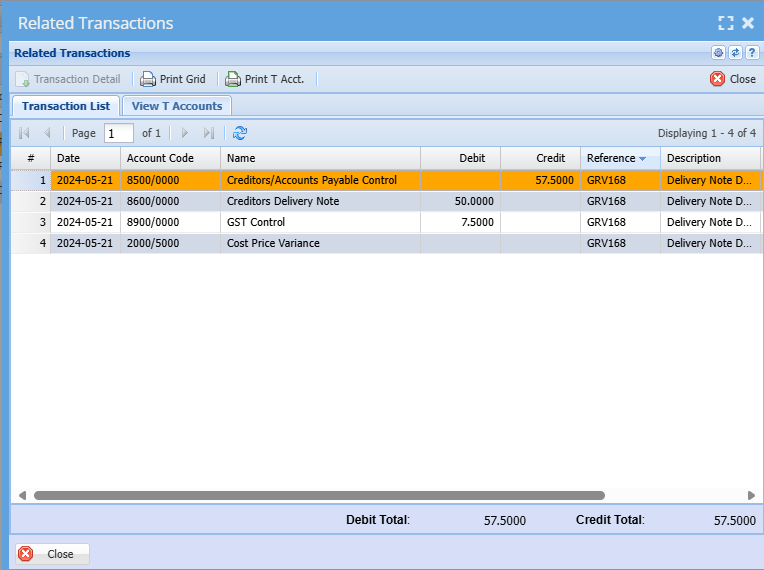
Creditors Delivery note account should always equal to zero IF you have received all the invoices from the suppliers.
A balance can happen at month end or year end, if one has not received the matching supplier invoice.
There can be a timing difference between the date receipted of goods to the date of processing the supplier invoice.
Reports
To add the new reports for Delivery note, go to System Configuration Module>Security>Report Security
Click on the Permissions button to add the permissions to the user role to add the reports.
The two reports are:
| Delivery note Age Analysis | this report shows the outstanding amounts in an age analysis format of delivery notes received but not posted to Creditors Control Account. This report should also balance to your Delivery Note Creditors Ledger account on your Trial Balance |
| Purchase Order to GRV unit price variance | This shows a report on all stock items that have had a price variance alternated between the Purchase Order unit cost. Receipt of the stock at that unit cost price and the change price of the Delivery note GRV. |
Reports
| 1 | Delivery note Age Analysis |
| 2 | Purchase Order to GRV unit price variance |
No Comments