
Export Schedule Maintenance
The export schedule allows you to setup multiple ways of exporting source data for review.
SQL queries can be gotten from your ERP consultant
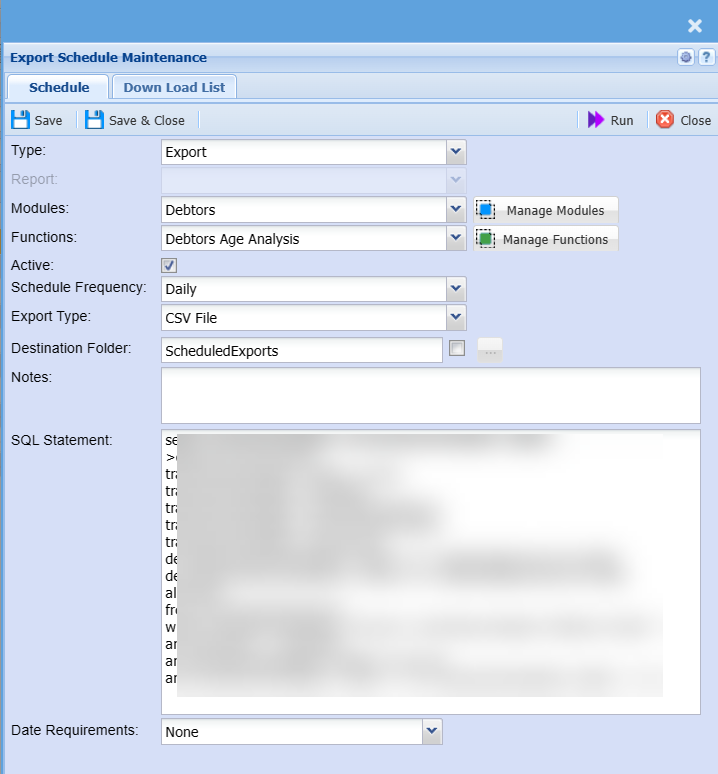
Schedule Tab
Fields defined
| Type |
Export - Exporting data type Report - Creating a report to export |
| Report | Reports predefined when Report type is selected |
| Modules | Select from a drop down menu where one has defined the module |
| Functions | Select from a drop down menu where one has been defined under the module |
| Active | Make the export or report active or inactive |
| Schedule Frequency | Select from a drop down menu for daily, weekly or monthly |
| Export Type | Specify CSV or XML |
| Destination Folder | Specify the default folder |
| Specific destination | Click on the button to set the path for files to be exported to. This is used for one drive for share point. When using this, the file will be inserted into this folder and the default folder |
| Notes |
Enter the notes of what the export is about Short description of export |
| SQL Statement |
Paste the SQL query |
| Date Requirements |
Only required when reports are run. SQL query works with a date |
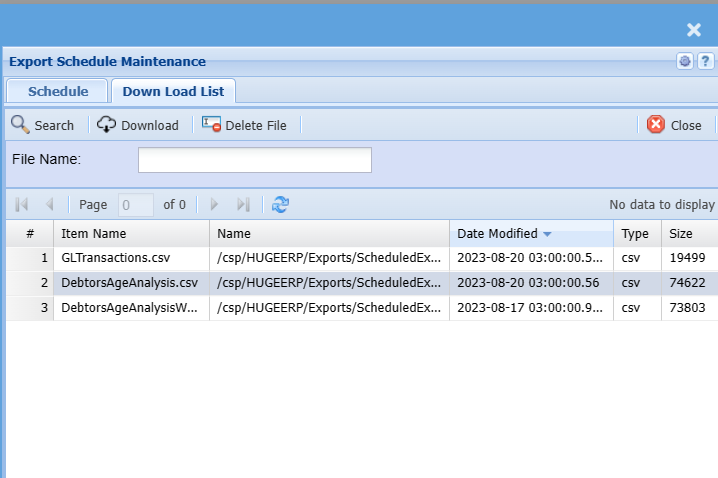
Download List
Download the CSV or delete the file
Files are overridden each time the schedule runs
No Comments