
Supplier Summary Report
Creditors >Reports > Report List
This report shows GRVs, less Stock return notes per Creditor. The information is spread over the number of financial months indicated within the criteria given in a table form.
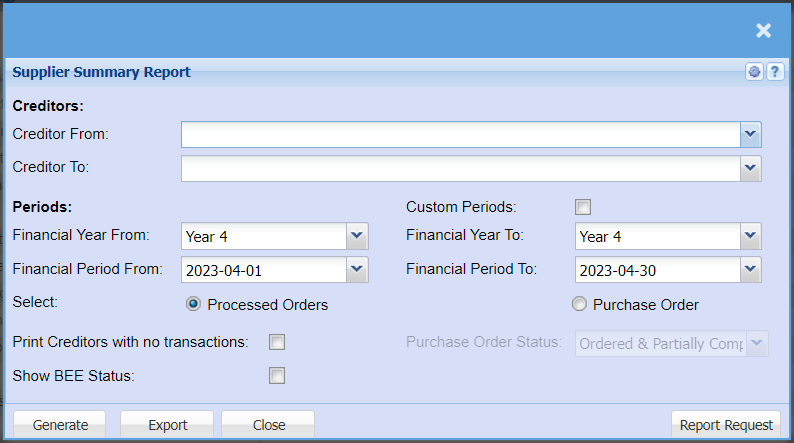
| Creditors | Select a creditor/supplier from the drop-down menu that you would like to pull a report for. |
| Financial Year From / Financial Year To | Select the financial year from and year and to year, to run the report for |
| Financial Period From / Financial Period To | Select the Financial Period from Dates to and from, to run the report for |
| Select |
Select the report type from the radio buttons Processed Orders – GRVs less Stock Return Note and Creditor Transactions marked as Purchases. Purchase Orders |
| Print Creditors with no Transactions | Allows the report to print creditors with no transactions |
| Show BEE Status | Activated two columns for BEE Level and BEE Expiry Date |
| Custom Periods | Here you can select a random date to pull this report for that does not have to be a financial year. |
| Purchase Order Status | Select the status from the drop down as specified except for, Purchase Order Book |
| Generate |
Click the "Generate" button to open the report. You will have options to copy, email, or print the report. To view the report in an Excel document, copy the report and paste it into an Excel file. |
| Export | This allows you to export the report to an Excel file |
| Report Request |
Purchase Order Book Includes the following;
| 1 | Ordered |
| 2 | Partially Completed |
| 3 | Completed |
| 4 | Closed |
Purchase Order Book plus Authorized status
Includes the following;
| 1 | Ordered |
| 2 | Partially Completed |
| 3 | Completed |
| 4 | Closed |
| 5 | Authorized |
No Comments