
Supplier Delivery Performance Report
Creditors >Reports > Report List
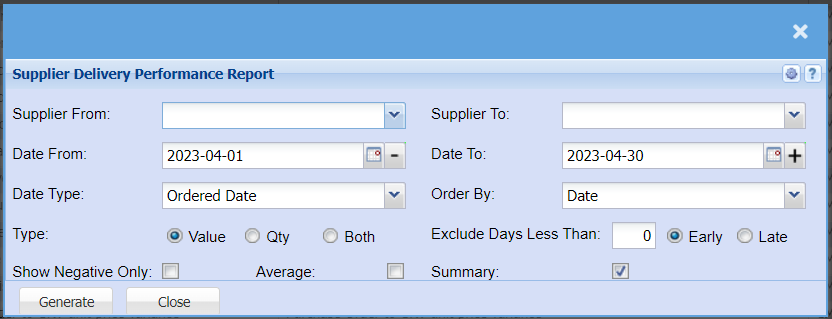
| Supplier From / Supplier Tp | Select a Suppliers/Creditors you wish to view the report from. Select the Suppliers/Creditors you wish to see up to in the report. |
| Date From / Date To | Choose the date range for which you want to view the report from / Select a date range of when you want to see up to on the report. |
| Date Type | Select the date you would like your report to reflect, your options are Ordered Date, PO Date, Delivery date or GRV Date. |
| Type | Select if you would like a report for Value, Quantity or both. |
| Order By | Select from the drop-down menu how you would like your report ordered by Date or Document Number |
| Exclude Days Less Than | Select the number of days less than the Delivery date from a supplier |
| Early / Late | Select if you are wanting a report for Early or Late deliveries |
| Show Negative Only Tick | Tick the box if you would like to have a report with Negative Values only. |
| Average Tick | If you put the tick on the report will add a column that will show the supplier average |
| Summary | If you put the tick on the report will only pull limited information |
| Generate | Click the "Generate" button to open the report. You will have options to copy, email, or print the report. To view the report in an Excel document, copy the report and paste it into an Excel file. |
No Comments