
Inventory WIP Breakdown
This report shows all inventory stock type items of total movement taken place in warehouses vs warehouse instance as well as movement in Work in Progress areas. Checks that stock balance movements are correct.
Inventory module> Reports> Reports List
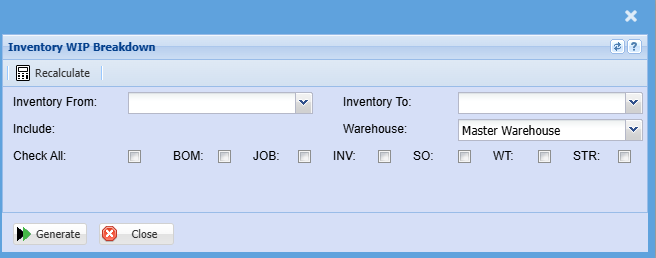
To run the report, select the inventory as the start item and inventory to as the end item. The
report will run according to the selection made
| Inventory From |
If you leave the stock item fields blank, all stock items will be displayed on the report. If you choose specific stock items, the report will sort information by stock item code from and to the selected codes rather than description. |
| Include | This allows the user to choose which workflows they want to include in their report. |
| Check All | This allows the user to select some or all of the options that will be included on the report |
| Warehouse |
If you select all warehouses the report will fetch data from all warehouses If you want to search by a specific report, select the report on the warehouse selection |
| Generate Button |
Click the "Generate" button to open the report You will have options to copy, email, or print the report To view the report in an Excel document, copy the report and paste it into an Excel file |
No Comments