
Document Management Spec
The purpose of Document Management is to help customers add attachments to the system that are not linked to any transaction documents.
Some examples are as follows
- VAT / GST returns with all of its attachments
- Supplier monthly statements
- Customer contracts
- Customer payment advises
- Company document legal information which I would put under system configuration
- The general company contracts like insurance I would put under the General Ledger
This will be available on all modules under the analysis section.
The document number that is produced will be the line ID in the table with a prefix of DOC
When you go into the specific module the search criteria for a module will automatically populate.
This will be greyed out by default and to enable it you need to go to with additional security on the top right-hand corner.
Again this is similar to how the report list works when you go into the modulator defaults to the module.
The drop-down will have additional security based on whether the user has access to that module.
It doesn't matter what type of security a user has as long as they have security to that module
The delete function doesn't delete the item but just flags it as deleted and then the search will not search for deleted items
If somebody deletes the document, we need to record this under the user management section.
You can find the document management menu under the following modules:
- System configuration
- General Ledger6
- Debtors/ Customer
- Creditors/ Supplier
- Inventory
- ob costing
- CRM
- TrackIT
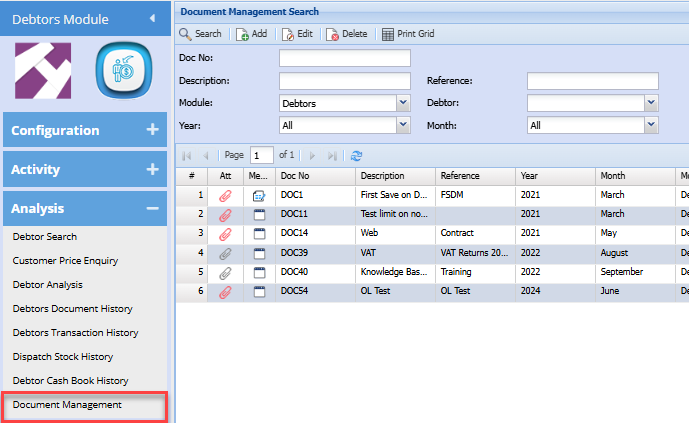
Add
To add a new document to the system, click add
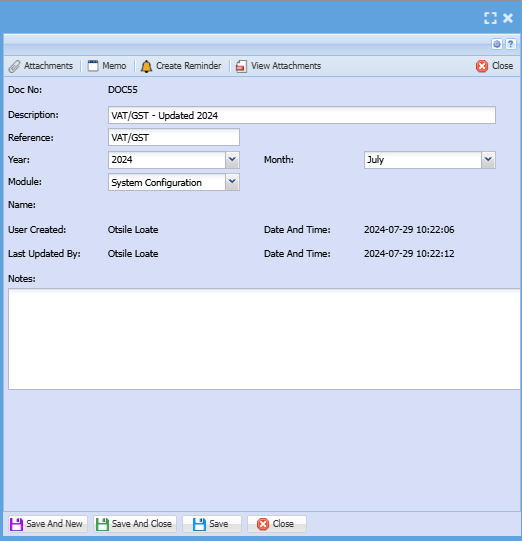
| Doc No | The document number is system-generated |
| Description | Enter a description for the document you wish to manage |
| Reference | Enter reference |
| Year | Select the year |
| Month | Select the month for the document |
| Module | Select the module you want to save the document under on the drop-down selection |
The user that created this and the date and the time that it was created are recorded.
The last updated by with date and time which effectively records who made changes on this when they click on save or save and close
No Comments