
Expenses
Expenses are used to process claims for reimbursement.
Expenses help with accurate and timely expense claiming
Faster expense processing.
Employee satisfaction.
Experience processing cuts costs
Reduce errors and mistakes done by the manual traditional process.
Increased expense claim transparency.
CRM Module> Activity> Expenses
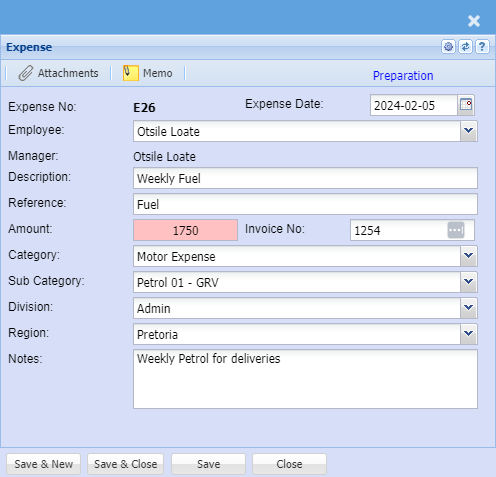
| Expense Date | Capture the correct date for the expense you are claiming for |
| Employee | Select the employee who is claiming on the drop down list. |
| Manager | The assigned approver will populate in this field |
| Description | Enter the expense description. |
| Reference | Enter the expense reference |
| Amount | Enter the expense amount. |
| Invoice No | Enter the supporting document number |
| Category | Select the category on the drop down |
| Sub Category | Select the sub category on the drop down |
| Division | Select the division on the drop down |
| Region |
Select the region on the drop down |
| Note | Allows you to add additional notes on the expense/ claim |
You can attach
.png)
Once the information has been captured
the user clicks on send approval - this emails the approver regarding this claim.
.png)
The status of the expense claim will now change to awaiting approval.
.png)
No Comments