
Job Manage Utility Fix
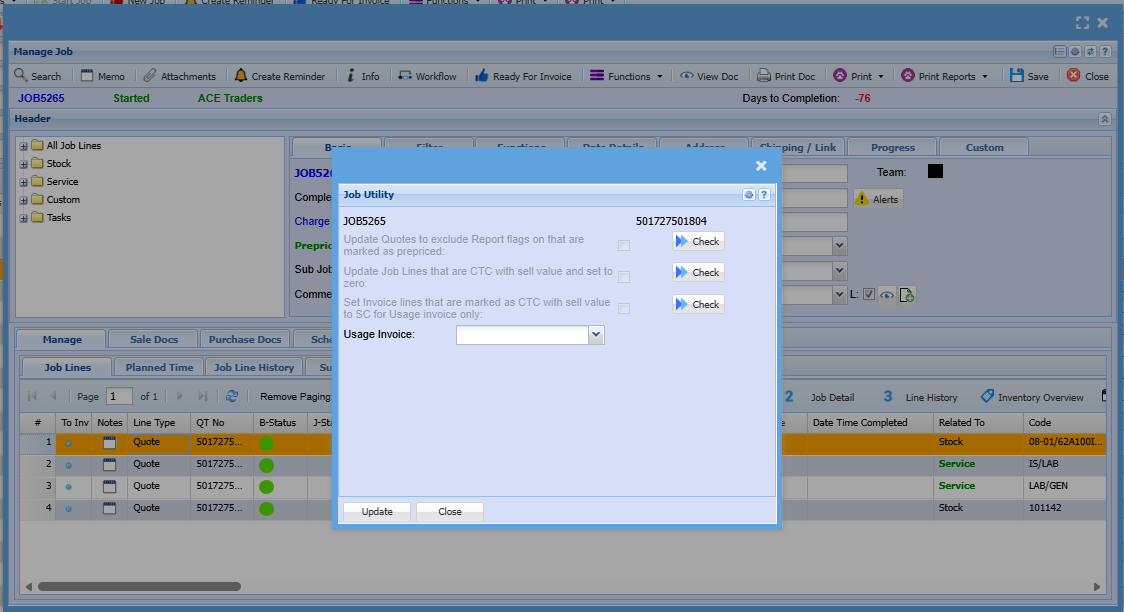
Update quotes to exclude Reports flag on that are marked as prepriced
This flags the quotes with the Exclude from Reports tick box
In each of the first query, you need to note the quote numbers to update
Rules
Only sub quotes with . numbers are applicable
Any quotes that have the Charge up and prepriced ticked are excluded
Any quotes that have the prepriced ticked and not the charge up tick are eligible for the query update.
Run query for each quote that means the condition
Update Job lines that are CTC with sell value and set to zero
This sets CTC lines that have a selling value to zero for both job lines and job history lines
The second query checks for any job lines that are marked as CTC and have a sell price in them.
If any are found, then tick the box to run the queries
There are two queries to run for the job
Set Invoice lines that are marked as CTC with sell value to SC for Usage invoice only
This changes usage invoice lines that are CTC which have a sell value to SC line
It also sets the SC line to display quantity based on quantity to sell
This is to ensure that the invoice displays the correct lines to match to the total of the invoice
The third query
This is specific to only usage invoices on this job
In order to active the check button, one must select an invoice to update which searches for usage invoices only linked to this job
No Comments