
Inventory Analysis of Movement by Group Codes etc.
Inventory Analysis of Movement Grouped by Group Codes, Inventory / Debtor or Creditor
This is a report on inventory analysis of movement grouped by group code, inventory/ debtor or
creditor
Inventory module> Reports> Reports List
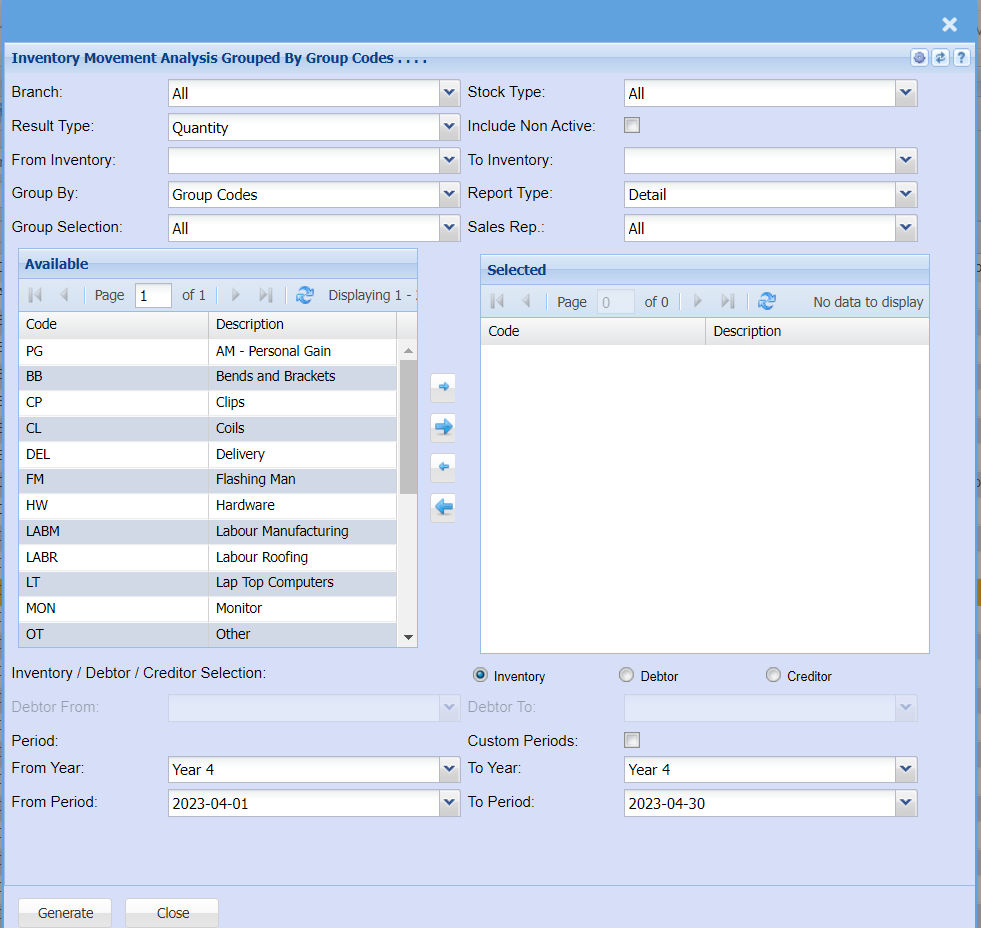
| Branch | To select the branch from the drop-down menu |
| Result Type | To select the results type from the drop-down menu |
| From Inventory | Select the inventory where the report will start from |
| Group By | The report can be grouped by selecting one option from group by drop down arrow |
| Group Selection | Double click on the code from the list to move the group codes you wish to filter your report by to the selected window. |
| Stock Type | Select the stock type from the drop-down menu |
| Include Non Active Tick | Put a tick on to include all inactive stock items |
| To Inventory | Select the item code to halt the report. |
| Report Type | Report Type allows the user to select either detail or summary from the drop-down arrow. |
| Sales Rep |
If you leave sales rep on all the report will run by all sales rep If you want to run a report by a specific sales rep, then you will need to select the sales rep on the drop-down menu selection |
| Inventory / Debtor / Creditor Selection | This allows you to choose if you with to run a report by debtor/customer or by supplier/creditor |
| Debtor From / To |
Select a Customer/Debtor you wish to view the report from. Select the Customer/Debtor you wish to see up to in the report. |
| Year From / To | Select the year From and year to from the drop-down menu |
| Period From / To | Select the period From and the period to from the drop-down menu |