
Inventory Analysis of Movement by Group Codes etc.
Inventory module> Reports> Reports List
Inventory Analysis of Movement Grouped by Group Codes, Inventory / Debtor or Creditor
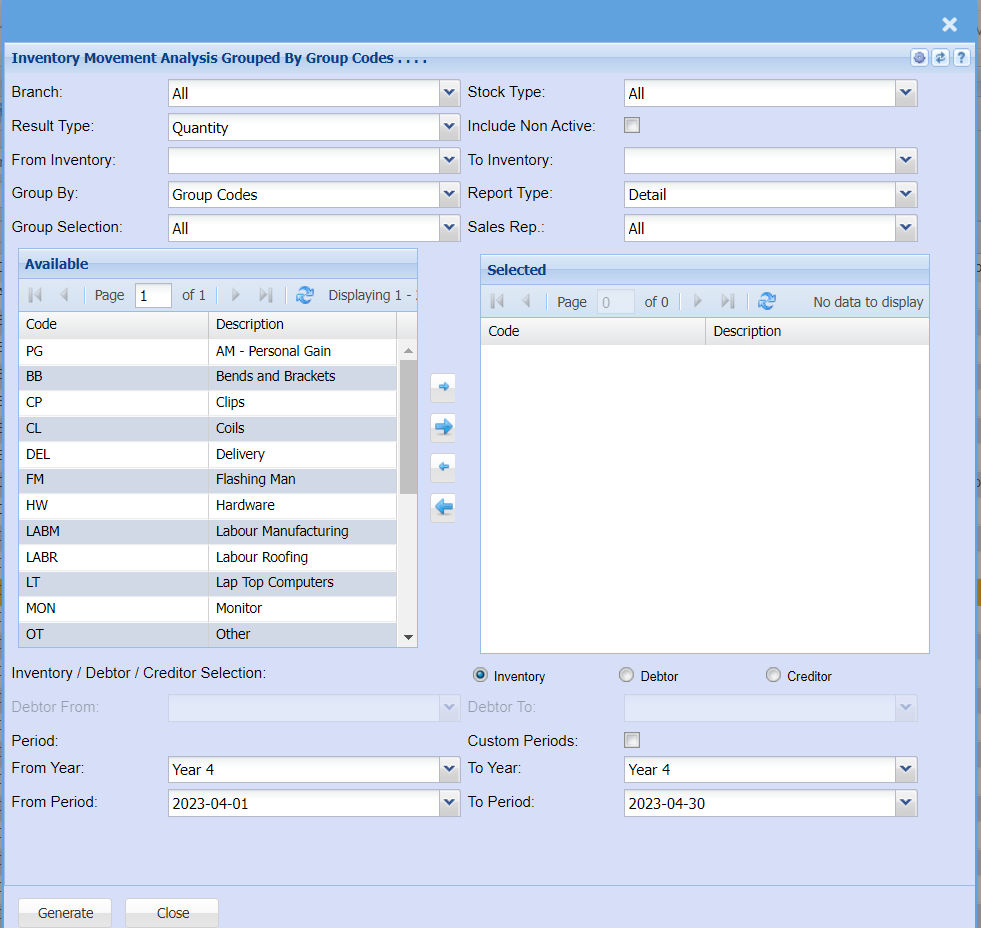
This is a report on inventory analysis of movement grouped by group code, inventory/ debtor or
creditor
Inventory Details allows the user to select necessary fields to run the report or just click on
generate button without selecting anything even though it won’t be specific
From the available column, select the group codes and shift them onto the right column for the
report
| Branch | to select the branch from the drop down arrow |
| Result Type | to select the results type from the drop down arrow |
| From Inventory | select the inventory where the report will start from and also select the where it's going to stop (inventory to). |
| Group By | The report can be grouped by selecting one option from group by drop down arrow |
| Group Selection | |
| Stock Type | select the stock type from the drop down arrow |
| Include Non Active Tick | |
| To Inventory | |
| Report Type | Report Type allows the user to select either detail or summary from the drop-down arrow. |
| Sales Rep | |
| Inventory / Debtor / Creditor Selection | this allows the user to choose one option for the report |
| Debtor From / To | |
| From Year / To Year | |
| From Period / To Period |