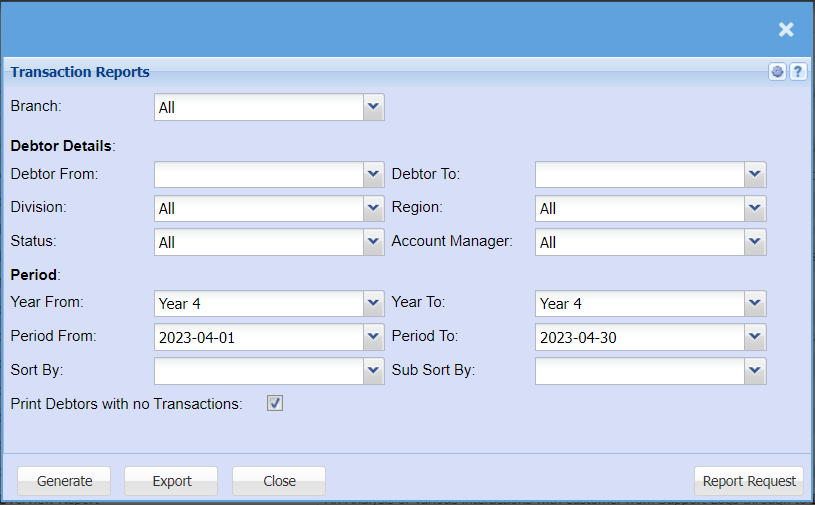
Transactions Report
Debtors >Reports > Report list
Full transactional history of all postings in debtors with opening and closing balance per debtor and movement between dates specified.
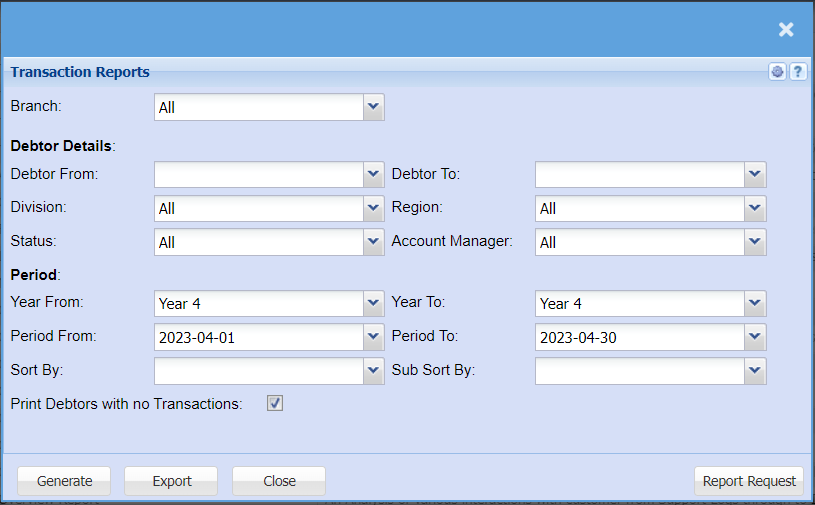
This is a debtor’s full transactional history of posted documents
| Branch |
When working with multiple branches this drop-down allows the user to select thea specific branch fromto thepull dropa downreport arrowfor. |
| Debtor From / Debtor To |
Select a Customer/Debtor you wish to selectview the debtorreport fromfrom. whichSelect the transactionCustomer/Debtor reportyou willwish runto fromsee up to in the report. |
| Division |
toIf you have set up divisions for your debtors, you can pull the report for all your debtors or you can select thea divisionspecific Division from the drop drop-down arrowmenu. |
| Status |
If you select all the report will pull all statuses. If you want to view report by status, select the report status fromon the drop drop-down arrow |
Debtor To |
to limit debtors report by selecting the debtor tomenu |
| Region |
toYou can pull the report for all your debtors, or you can select thea regionspecific Region from the drop drop-down arrowmenu if you have set up Regions for your debtors. |
| Account Manager |
toYou can pull the report for all your debtors, or you can select thea accountspecific Account manager from the drop drop-down arrowmenu if you have set up Account Managers for your debtors. |
| Year From / Year To |
toSelect selectthe year fromFrom and Year To Dates from the drop drop-down arrowmenus will show results specific to the period you have selected. |
| Period From / Period To |
to selectSelect the period fromFrom and the periodPeriod To from the drop drop-down arrowmenus |
| Sort By |
Select how you would like your report to sortbe the reportsorted by selecting one option from the drop drop-down arrowmenu allows the user to pull a report with a secondary criteria that will be sorted by either, date Reference, Description, Debit or Credit. |
| Print Debtors with no Transactions |
to tick the box in order to include debtors with no transactions |
Year To |
to select year from and Year To from the drop down arrow |
Period To |
to select the period from and the period To from the drop down arrow |
Sub Sort By |
toSub selectSort subthe sortreport by selecting one option from the drop drop-down arrowmenu allows the user to pull a report with a secondary criteria that will be sorted by either, date Reference, Description, Debit or Credit. |