
Sales Order Back Order
Debtors >Reports >Report list
The report gives the value or quantity outstanding on sales orders in different status levels.
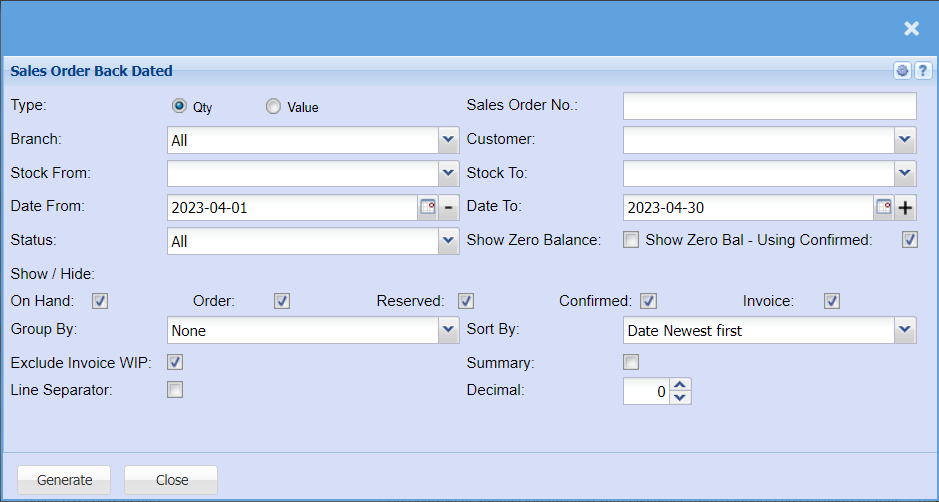
| Type | Type allows you to |
| Branch | When working with multiple branches this drop-down allows the user to select a specific branch |
| Stock From | |
| Date From / Date To | |
| Status | If you select all the report will pull all statuses. If you want to view report by status, select the |
| Show / Hide | Tick the boxes of the back orders you would like to include in your report, if they are not ticked, they will be excluded from the report. |
| Group By | |
| Exclude Invoice WIP | by ticking the box, the report will exclude invoice WIP |
| Line Separator | |
| Sales Order No | IF you know the sales order number, you can add it here. |
| Customer | |
| Stock To | to select the stock to, in order to limit the stock run report |
| Show Zero Balance | by ticking the box, the sales order back dated report will include zero balance |
| Show Zero Bal - Using Confirmed | |
| Sort By | to sort the report by selecting from the |
| Summary | by ticking the box, the report will include the summary |
| Decimal | It is advisable to set decimals to two places. You can View the report with any number of decimal places. |