
Supplier Summary Report
Creditors >Reports > Report List
This report shows GRVs, less Stock return notes per Creditor. The information is spread over the number of financial months indicated within the criteria given in a table form.
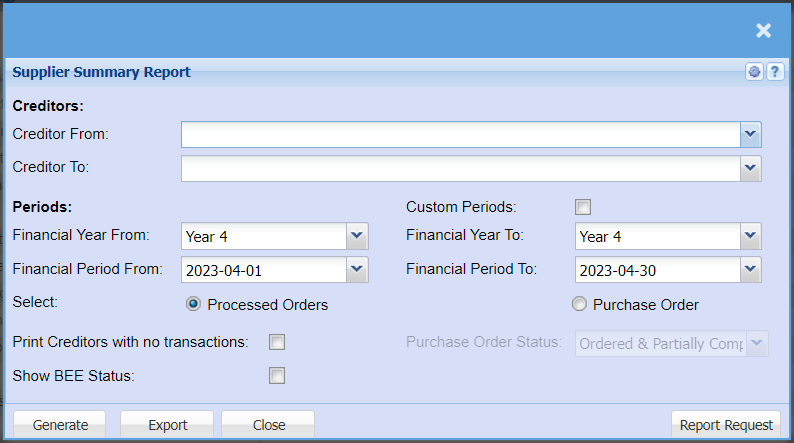
| Creditors | To select the creditor from and the creditor to, for running the report |
| Financial Year From | to select year from and year to, for running the report |
| Select |
to select the report type from the radio buttons Processed Orders – GRVs less Stock Return Note and Creditor Transactions marked as Purchases. Purchase Orders |
| Print Creditors with no Transactions | to allow the report to print creditors with no transactions |
| Show BEE Status | Activated two columns for BEE Level and BEE Expiry Date |
| Custom Periods | |
| Financial Year To | to select year from and year to, for running the report |
| Financial Period To | to select the period from and the period to, for running the report |
| Purchase Order Status | to select the status from the drop down as specified except for, Purchase Order Book |
| Generate |
to run the report |
| Export | |
| Report Request |
Purchase Order Book Includes the following;
| 1 | Ordered |
| 2 | Partially Completed |
| 3 | Completed |
| 4 | Closed |
Purchase Order Book plus Authorized status
Includes the following;
| 1 | Ordered |
| 2 | Partially Completed |
| 3 | Completed |
| 4 | Closed |
| 5 | Authorized |