
Purchase Orders
Creditors >Reports > Report List
Shows a report on different statuses of Purchase Orders. This includes what has been ordered, received, processed and balances. The criteria for this can be chosen by Creditors or date and stock.
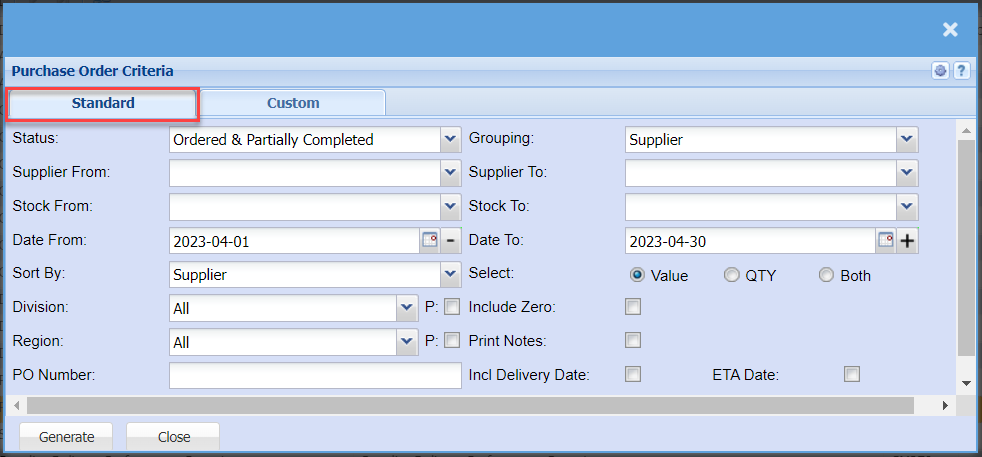
| Status | to select the status from the drop down arrow |
| Supplier From | to select the supplier from which the report will run from |
| Stock From | to select the stock item from which the report will run from |
| Date From | to select the date from which the date will run from |
| Sort By | to sort the report by selecting from the drop-down arrow |
| Division | to select the division from the drop down arrow |
| Region | to select the region from the drop down arrow |
| PO Number | |
| Grouping | to group the report by selecting from the drop down arrow |
| Supplier To | to limit purchase order criteria report by selecting the date to |
| Stock To | to limit stock report by selecting the stock to |
| Date To | to enter the date to, in order to limit the report |
| Select | |
| Include |
|
| Print |
|
| Incl Delivery Date | |
| ETA |
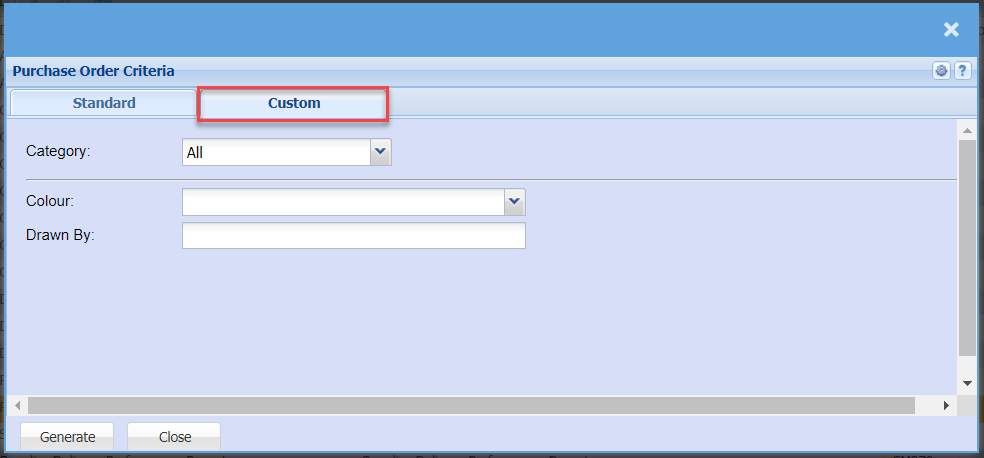
| Category | |
| Colour | |
| Drawn By |