Document History
Creditors >Reports > Report List
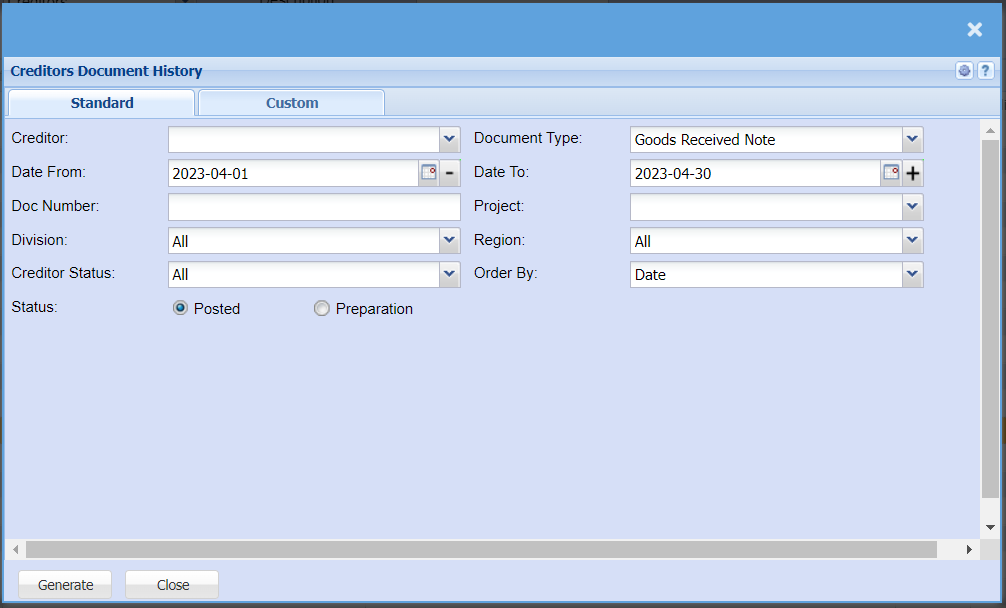
Shows a full report of Creditors Documents which have been posted. Report is filtered by Document type and date.
This is a full report of posted documents of a selected creditor
| Creditor |
toSelect selecta creditor/supplier from the creditordrop-down menu that you would like to pull a report for. |
| Date From / Date To |
to selectChoose the date fromrange for which you want to view the report willfrom run/ fromSelect a date range of when you want to see up to on the report. |
| Doc number |
to enterEnter document number if you know it |
| Division |
toIf you have set up divisions for your debtors, you can pull the report for all your debtors or you can select thea divisionspecific Division from the drop drop-down arrowmenu. |
| Creditor Status |
to select the status from the drop drop-down arrow |
| Status |
If you select all the report will pull all statuses. If you want to view report by status, select the document status -on Postedthe ordrop-down Preparationmenu |
| Document Type |
to selectSelect the documentDocument typeType from the drop drop-down arrow | menu
that you Datewould To | like to pull document history for. you can select thefrom dateGoods toReceived Notes, Stock Return, Purchase Order, Delivery Note or GRV and Stock Return. |
| Project |
toIf this report is for a specific project, select athis project from the drop-down menu. |
| Region |
toYou can pull the report for all your debtors, or you can select thea regionspecific Region from the drop drop-down arrowmenu if you have set up Regions for your Creditor. |
| Order By |
Select how you would like your report to arrange the document history by selectingbe order by from the drop drop-down arrowmenu, you can choose from Date, Creditors Name, Reference, Doc Number, Description, Currency, Project, tax Total or tax include or exclude. |
| Generate button |
Click the "Generate" button to runopen the report. You will have options to copy, email, or print the report. To view the report in an Excel document, copy the report and paste it into an Excel file. |