
Document History
Creditors >Reports > Report List
Shows a full report of Creditors Documents which have been posted. Report is filtered by Document type and date.
This is a full report of posted documents of a selected creditor
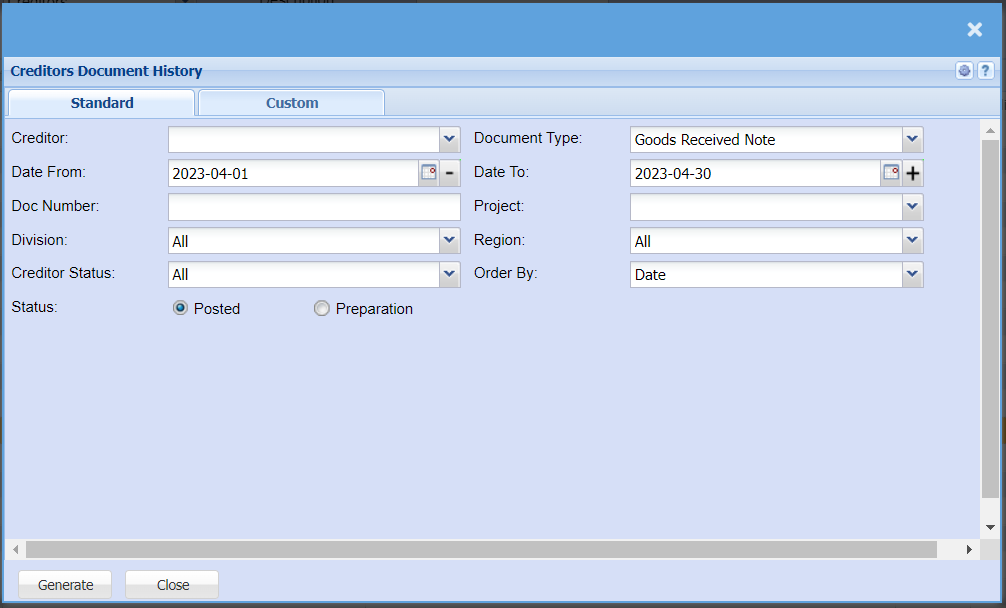
| Creditor | to select the creditor |
| Date From | to select the date from which the report will run from |
| Doc number | to enter document number |
| Division | to select the division from the drop down arrow |
| Creditor Status | to select the status from the drop down arrow |
| Status | to select the document status - Posted or Preparation |
| Document Type | to select the document type from the drop down arrow |
| Date To | select the date to |
| Project | to select a project |
| Region | to select the region from the drop down arrow |
| Order By | to arrange the document history by selecting order by from the drop down arrow |
| Generate button | to run the report |