
Debtors Document History
Search on all posted debtors documents
Posted documents reside here from the Activity Menu
Debtors > Analysis> Document History
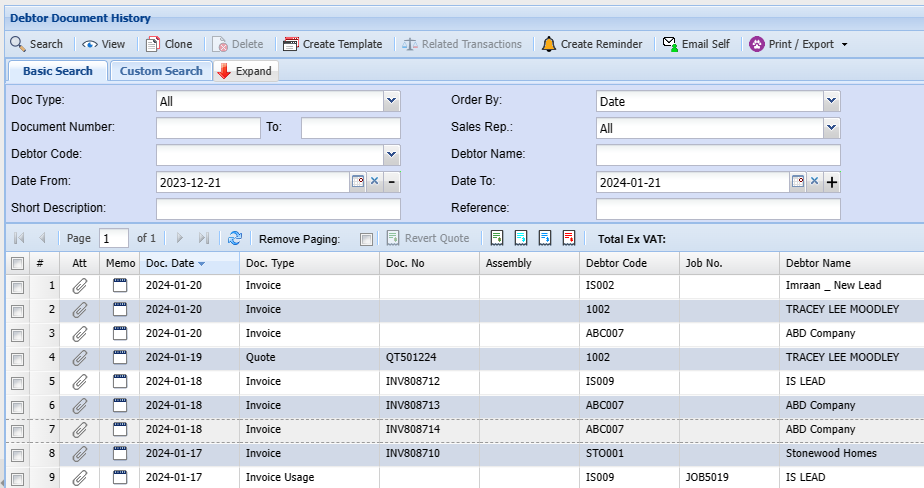
This allows you to search for any documents created.
| Document Type | Select the type of document you wish to find. |
| Document Number | Enter a specific document number if applicable. |
| Debtor Code | Enter a specific debtor’s code to narrow down search results. |
| Date From and to | Enter the time frame in which the search should run. |
| Short Description | Enter the short description that would appear on the document. |
| Order By | Select the order in which the results should be displayed. |
| Sales Rep | Select the sales representative to narrow down search results. |
| Debtors Name | Enter the Debtors name to narrow down search results. |
| Reference | Enter a reference that would have appeared on the document. |
Functions
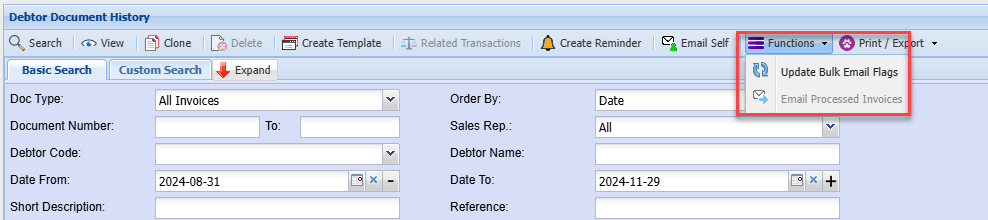
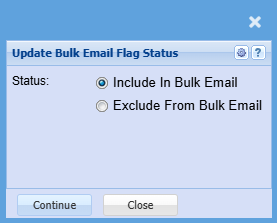
Update Bulk Email Flags
No Comments