
User Management – User Search
Video Training Manual 2016 - Click Here
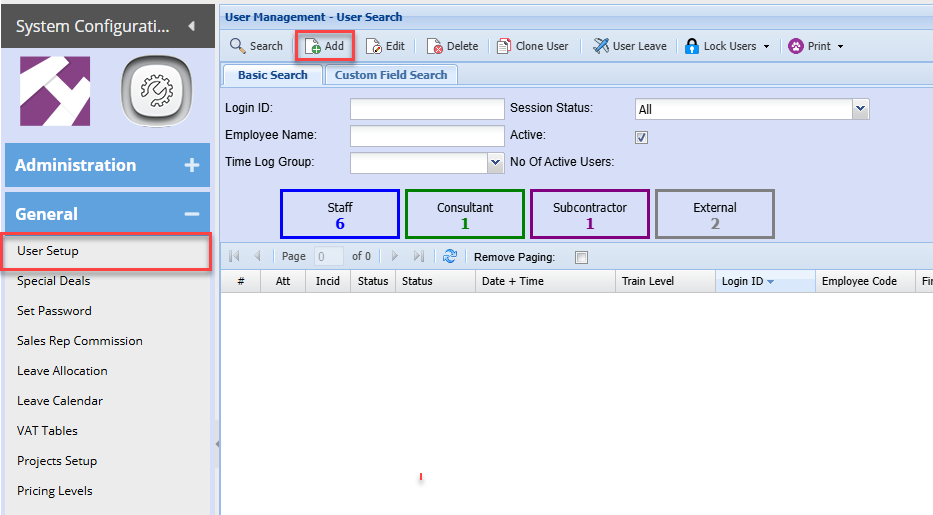
To add a new user go to
Systems Configuration Module> General> User Setup
To add a new user click Add
Details 1
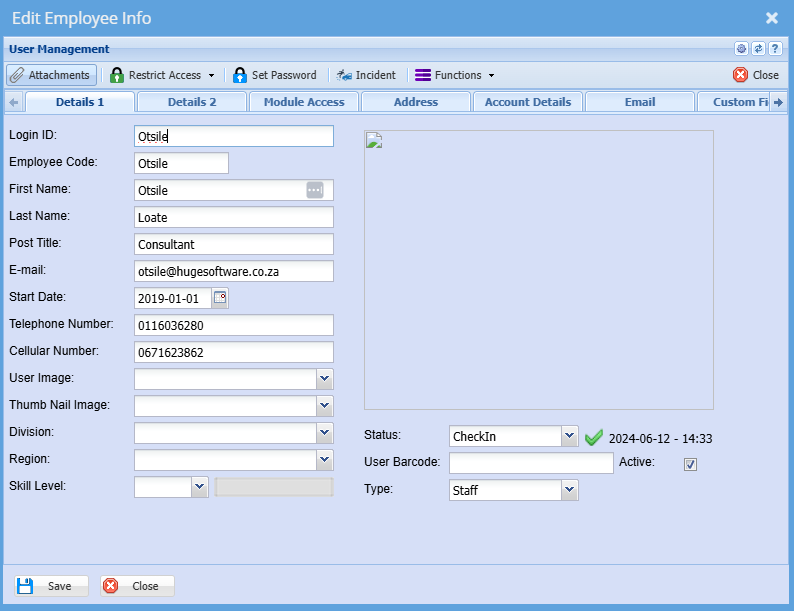
The screen below will appear, add information as show
| LoginID |
This is a user username Enter the user's username it can contain letters and numbers |
| Employee Code | Enter the user's employee code |
| First Name | Enter the user's first name |
| Last Name | Enter users surname |
| Post Title | Enter users title |
|
Enter the user's email address The email address will be used to send out documents from the system |
|
| Start Date |
Enter the date the user started working for the company. |
| Telephone Number | The company telephone number or user work number |
|
Cellular Number |
Enter the user's cellphone number. This is not compulsory |
Once complete click save and then click on Details 2
Details 2
| User Leave | Shows the leave allocated to that specific User. |
| Log User Off | Logs the currently selected Employee out. |
| Lock User | Locks the currently selected Employee. |
| Unlock User | Unlocks the currently selected Employee. |
| Lock All Users | Locks all Employees. |
| Unlock All Users | Unlocks all Employees. |