
Sales Leads - Reminder Create
MakeThis section of the Edit Lead screen controls key date fields smaller
•Swapreminder Followfunctionality upfor datemanaging follow-ups and estimatedexpected close dateclosure.
If the Follow Up Date is changed When saving again with the tick box •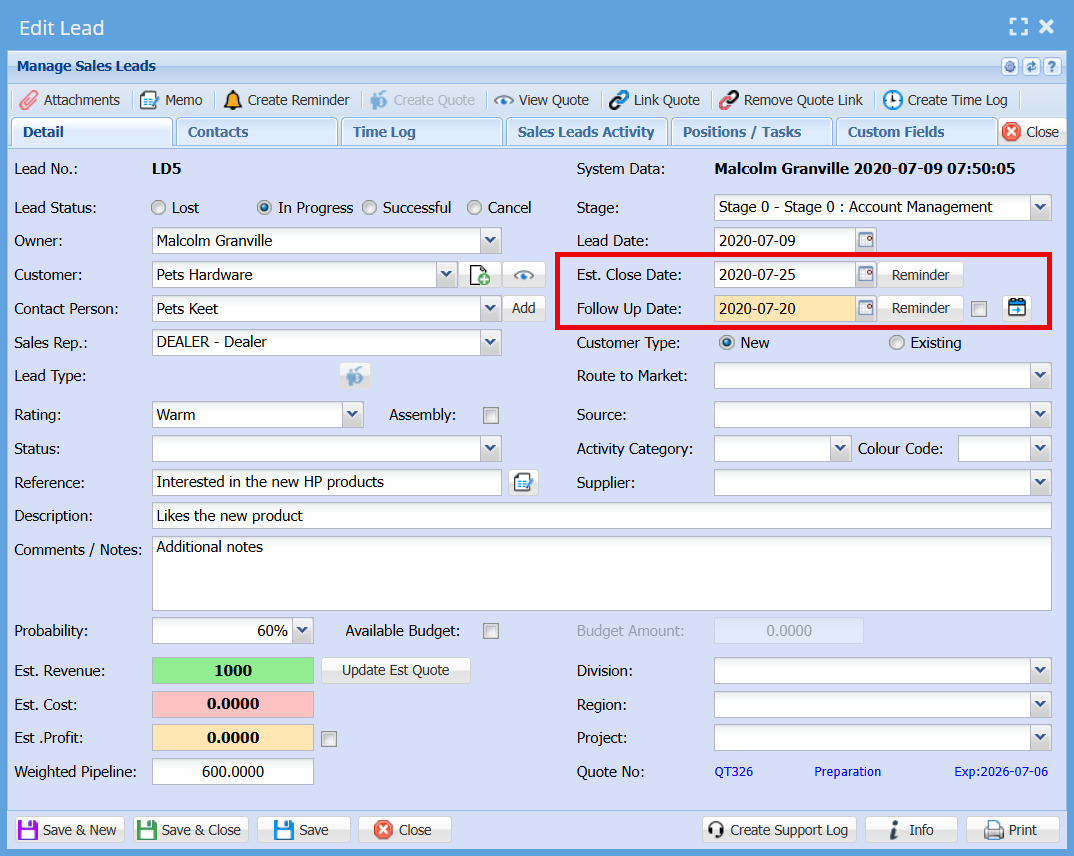
Field Layout & Display
upUp dateDate is positioned below the Estimated Close Date (swapped from the original layout).creamis backhighlighted ground
•Putwith a cream backgroundReminder Buttons
Follow Up Reminder Tick Box
•NextA tick box is located next to the Follow upUp date,Date addfield, incontrolling tickautomatic boxreminder creation.Behaviour:
a.When adding a new salesSales lead,Lead
onselected (on) by default.b.When editing aan salesexisting lead,Sales Lead
offunselected (off) by default.c.When yousaving savethe lead (Save or saveSave and& closeClose)and
on, you will createselected, a reminder is automatically d.Ifcreatedyoubased changeon the Follow Up Date.
date,should thenbe putcreated.back onselectede.When
savingagain, it will create anew reminder basedis oncreated newusing date.png)
.png)