
Expenses Process
The expenses function allows you to process claims for reimbursement
Benefits of Expenses:
- Accurate and timely expense claim routing
- Increase in organisation efficiency
- Faster expense processing
- Employee satisfaction
- Expense processing costs cuts
- Reduce errors and mistakes done by manual claim process
- Increased expense claim and transparency
Go to CRM Module> Activity> Expenses
To add a new Expense Click add or click search to see a list of exisiting Expenses
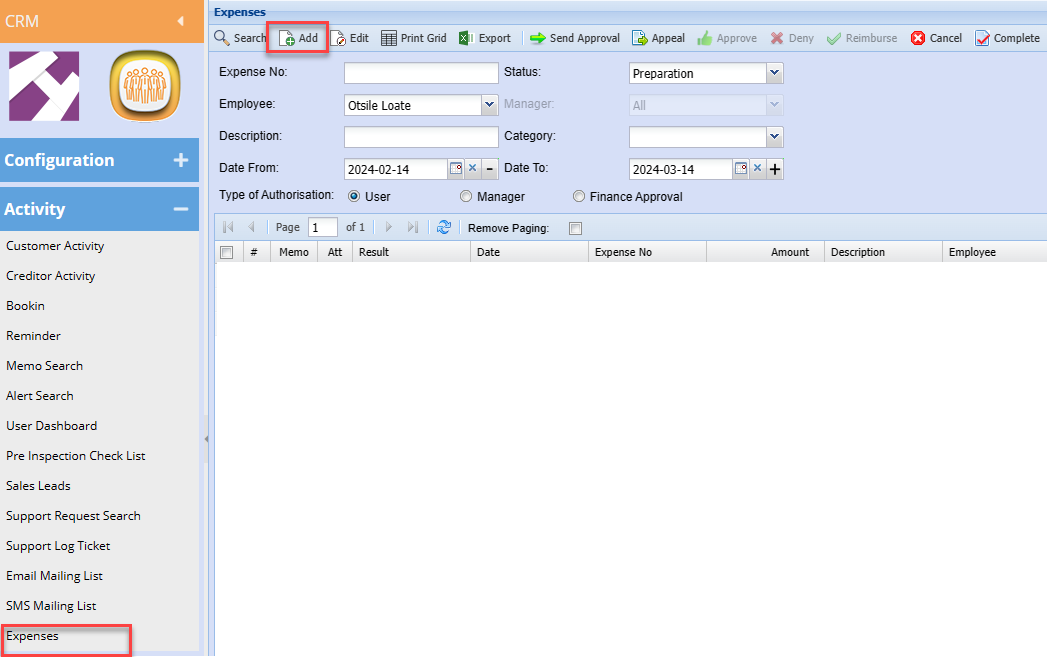
After clicking Add a screen below will appear, Add all necessary information as shown below
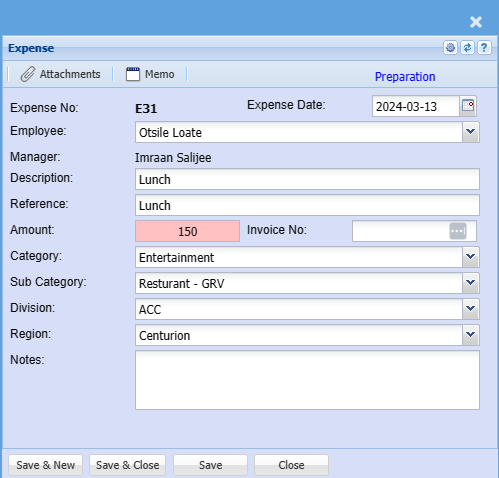
|
Employee |
Select the employee who is claiming on the dropdown list |
| Manager | The assigned approver will populate this field |
| Description | Enter claim description |
| Reference | Enter Claim reference |
| Amount | Enter the expense amount |
| Category | Select Category from the drop-down selection |
| Sub Category | Select the correct sub-category if there is more than one |
| Division | Enter division |
| Region | Enter region |
| Notes | Add detailed additional notes if applicable |
| Expense Date | Enter the correct date for the claim |
| Invoice No |
Enter the supporting document number if you have This is not compulsory |
Once you are done capturing you can load the receipt as proof on the attachments