
Alerts
Alerts allow an automatic pop pop-up to occur when selecting a specific customer, supplier, stock item and other sections within the system.
When creating the alert it will be in an active state
If you want to remove the alert, make the alert inactive or Cancel the alert
Alerts can be created across the system for various document types
SourceCRM TypesModule> areActivity> Alert Search
1.General Ledger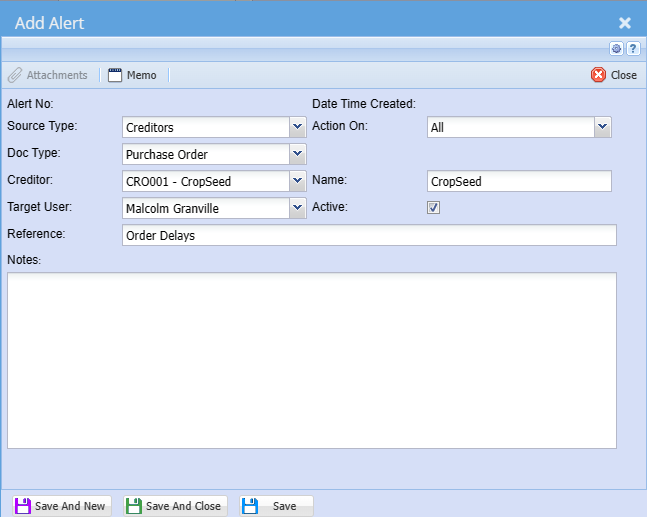
2.Customers/
Debtors
3.SuppliersSource
/TypeCreditors
4.Inventory
5.Job Costing
6.TrackIT
7.CRM / Webatar
.png)
Setting up the alert
The alert can be setup for various documents belowSelect the source type
Foryou Customers1.Allcreating an alert for on the drop down selection
Doc Type
Select the document type you are creating an alert for on a drop down selection
Creditor/ Debtor
Select the creditor or customer
typesyou 2.Customerare setups3.Customeran Transactions4.Quotation5.Saleson Order6.Invoice7.Creditdown Note8.Allocations
Target
TheUseralertsSelect the user who must see this alert on the drop down selection. You can
bealso forsend it to all users
Reference
Add alert search reference
Action on
Select when the alert must pop-up on the drop down selection
Name
Creditor or
acustomer specificnameuser
Active
The tick means that the alert is active and no tick means that the alert is anactive
.png)