
Barcode Printer Command Template Placeholders
These notes currently apply to GODEX printers.
Placeholders are used for barcode printing with command templates and reference substituted values. When a barcode is printed with a command template the template is searched for commands that may include the placeholders listed below as parameters. If a parameter is an exact match then it is replaced by the value for the placeholder. If the placeholder is unused, or is not set up to be swapped for any data, then the line with the command is removed before it is sent to the printer. The available placeholders depend on the item or document being printed.
Printer commands checked for Placeholders
| Description | Syntax | Notes |
|---|---|---|
| Printer Text | At,x,y,x_mul,y_mul,gap,rotationInverse,data |
Unformatted text |
| 1D Barcode | Bt,x,y,narrow,wide,height,rotation,readable,data |
Includes Code39 and Code128 |
| QR Code | Wx,y,mode,type,ec,mask,mul,len,roatae<CR>data |
len must be the length of the placeholder. Data starts at new line |
Valid Placeholders
Note – Any highlighted items may be WIP
General
[TODO merge into other sections and remove this section]
| Placeholder | Alternative Placeholders | Description | Notes |
|---|---|---|---|
BAR1 |
Barcode | ||
DESCR1 |
DESC1 |
Short Description | |
DESCR2 |
DESC2 |
Long Description | |
CAT1 |
Category | Not used [TODO support] | |
REF1 |
Reference | ||
JOB1 |
JOBNO1 |
Job Number | |
VER1 |
Version | Not used [TBD support] | |
ORDER1 |
ORDNO1 |
Order Number | |
CUST1 |
Customer Name | ||
DOC-DESC1 |
F-DESCR1 |
Document Description | [TODO delete if unused] |
DOC-REF1 |
F-REF1 |
Document Reference | [TODO delete if unused] |
DOC-JOBNO1 |
F-JOB1 |
Document Job | [TODO delete if unused] |
ADDR1 |
Address Line 1 | ||
ADDR2 |
Address Line 2 | ||
ADDR3 |
Address Line 3 | ||
ADDR4 |
Address Line 4 | ||
POST1 |
Postcode |
Assets
| Placeholder | Alternative Placeholders | Description | Notes |
|---|---|---|---|
BAR1 |
Asset Number (Default) OR Barcode (See Notes 3) |
[3] | |
BAR2 |
Barcode (Default) OR Asset Number (See Notes 3) |
[3] | |
CODE1 |
Stock Item Code | ||
DESCR1 |
DESC1 |
Asset Name | |
DESCR2 |
DESC2 |
Description | |
PDATE1 |
Purchase Date | ||
REF1 |
Reference |
Inventory – General
Common to all Inventory sections.
[TODO move Additional Properties here or to subsection]
| Placeholder | Alternative Placeholders | Description | Notes |
|---|---|---|---|
BAR1 |
Barcode | ||
CODE1 |
Stock Item Code | ||
LBL1 |
Label | ||
WGT1 |
WEIGHT1 |
Weight in units | |
SELLEX1 |
SELLEXCL1 SELL-EXCL1 |
Selling Price Excluding | |
SELLINC1 |
SELLINCL1 SELL-INCL1 |
Selling Price Including | |
%PRED% |
Predicted | ||
%FACTS% |
Facts |
Inventory – Accessory Grid
| Placeholder | Alternative Placeholders | Description | Notes |
|---|---|---|---|
ACCESSORIES_GRID11 |
ACC_GRID1 ACC_GRID(CODE,DESCR,QTY) |
Accessories Grid Type 1 Columns: Code, Description, Qty |
[1] |
|
|
ACC-GRID2 ACC_GRID(DESCR,QTY) |
Accessories Grid Type 2 Columns: Description, Qty |
[1] |
ACCESSORIES_GRID31 |
ACC_GRID3 ACC_GRID(QTY,DESCR) |
Accessories Grid Type 3 Columns: Qty, Description |
[1] |
ACC_CODE_0N2 |
Accessories Grid Code Row N | [2] | |
ACC_DESCR_0N2 |
Accessories Grid Description Row N | [2] | |
ACC_QTY_0N2 |
Accessories Grid Quantity Description Row N | [2] | |
ACC_REF_0N2 |
Accessories Grid Line Reference Row N | [2] |
Inventory – Additional Properties
| Placeholder | Alternative Placeholders | Description | Notes |
|---|---|---|---|
%PROP1% |
%P1% %PROP1C% %P1C% |
Additional Property 1 Code | |
%PROP2% |
%P2% %PROP2C%%P2C% |
Additional Property 2 Code | |
%PROP3% |
%P3% %PROP3C% %P3C% |
Additional Property 3 Code | |
%PROP1D% |
%P1D% |
Additional Property 1 Description | |
%PROP2D% |
%P2D% |
Additional Property 2 Description | |
%PROP3D% |
%P3D% |
Additional Property 3 Description | |
%PROP4% |
%P4% |
Additional Property 4 | |
%PROP5% |
%P5% |
Additional Property 5 | |
%PROP6% |
%P6% |
Additional Property 6 | |
%PROP7% |
%P7% |
Additional Property 7 | |
%PROP8% |
%P8% |
Additional Property 8 | |
%PROP9% |
%P9% |
Additional Property 9 | |
%PROP10% |
%P10% |
Additional Property 10 |
Inventory – Print Warehouse Label
| Placeholder | Alternative Placeholders | Description | Notes |
|---|---|---|---|
%PRNWHSCODE%4 |
%PRINT-WHS-CODE% |
Warehouse Code for Warehouses with "Print on Label" enabled when "Print WHS Label" enabled for the Inventory Item. | [4] |
%PRNWHSNAME%4 |
%PRINT-WHS-NAME% |
Warehouse Name for Warehouses with "Print on Label" enabled when "Print WHS Label" is enabled for the Inventory Item. | [4] |
Inventory – Wastage Item
| Placeholder | Alternative Placeholders | Description | Notes |
|---|---|---|---|
BAR1 |
%BAR% |
Wastage Item Code | |
%CODE% |
Wastage Item Code | ||
%DESCR% |
%DESCRIPTION% |
Wastage Item Description | |
%LEN% |
%LENGTH% |
Wastage Item Length | |
%WDTH% |
%WIDTH% |
Wastage Item Width | |
%HGT% |
%HEIGHT% |
Wastage Item Height | |
%WGT% |
%WEIGHT% |
Wastage Item Weight | |
%STKCODE% |
%STOCKCODE% |
Code of the Inventory Item for the Wastage Item | |
%STKDESCR% |
%STOCKDESCRIPTION% |
Short Description of the Inventory Item for the Wastage Item |
Inventory – Batch Serial Numbers
| Placeholder | Alternative Placeholders | Description | Notes |
|---|---|---|---|
%SERIAL% |
%BAR% |
Serial Number formatted with the Separators field from the form or without separators if the field is blank. | |
%STKCODE% |
%ITEMCODE% |
Stock Item Code | |
%STKDESCR% |
%ITEMDESCR% |
Stock Item Description | |
%PCODE% |
%PROD% |
Production Code. This is the Production Date in YYMMDD format by default. |
|
%BBDATE-NZ% |
Best Before Date New Zealand format. DD/MM/YYYY |
||
%BBDATE-INT% |
%BBDATE% |
Best Before Date International format. YYYY-MM-DD |
|
%FRESH% |
"Fresh" if the Fresh checkbox from the form is checked, otherwise blank. | ||
%FRESH-U% |
"FRESH" if the Fresh checkbox from the form is checked, otherwise blank. | ||
%FRESH-FRZN% |
"Fresh" if the Fresh checkbox from the for is checked, otherwise "Frozen". | ||
%FRESH-FRZN-U% |
"FRESH" if the Fresh checkbox from the for is checked, otherwise "FROZEN". | ||
%FRESH-YN% |
"Y" if the Fresh checkbox from the for is checked, otherwise "N". | ||
%STKWGT-2DP% |
%ITEMWGT-2DP% |
Weight of the stock item fixed to two decimal places. | |
%STKWGT% |
%ITEMWGT% |
Weight of the stock item to up two decimal places. |
Inventory – Batch Tracking
| Placeholder | Alternative Placeholders | Description | Notes |
|---|---|---|---|
%BATCHNO% |
%BATCHNUMBER% |
Batch Number | |
BAR1 |
Stock Item Barcode | ||
%STKCODE% |
CODE1 |
Stock Item Code | |
%STKDESCR% |
DESCR1 DESC1 |
Stock Item Description | |
%PCODE% |
Production Code. This is the Production Date in YYMMDD format by default. |
||
%BBDATE-NZ% |
Best Before Date New Zealand format. DD/MM/YYYY |
Is specific to the batch | |
%BBDATE-INT% |
%BBDATE% |
Best Before Date International format. YYYY-MM-DD |
Is specific to the batch |
%WI-BBDATE-NZ% |
Best Before Date New Zealand format. DD/MM/YYYY |
Is specific to the item's Warehouse | |
%WI-BBDATE-INT% |
%WI-BBDATE% |
Best Before Date International format. YYYY-MM-DD |
Is specific to the item's Warehouse |
%STKWGT-2DP% |
%ITEMWGT-2DP% |
Weight of the stock item fixed to two decimal places. | |
%STKWGT% |
WEIGHT1 WGT1 |
Weight of the stock item to up two decimal places. | |
LBL1 |
Stock Item Label | ||
SELLEX1 |
SELLEXCL1 SELL-EXCL1 |
Stock Item Selling Price Excluding | |
SELLINC1 |
SELLINCL1 SELL-INCL1 |
Stock Item Selling Price Including | |
%PRED% |
Stock Item Predicted | ||
%FACTS% |
Stock Item Facts | ||
%PROP1% |
%P1% %PROP1C% %P1C% |
Stock Item Additional Property 1 Code | |
%PROP2% |
%P2% %PROP2C%%P2C% |
Stock Item Additional Property 2 Code | |
%PROP3% |
%P3% %PROP3C% %P3C% |
Stock Item Additional Property 3 Code | |
%PROP1D% |
%P1D% |
Stock Item Additional Property 1 Description | |
%PROP2D% |
%P2D% |
Stock Item Additional Property 2 Description | |
%PROP3D% |
%P3D% |
Stock Item Additional Property 3 Description | |
%PROP4% |
%P4% |
Stock Item Additional Property 4 | |
%PROP5% |
%P5% |
Stock Item Additional Property 5 | |
%PROP6% |
%P6% |
Stock Item Additional Property 6 | |
%PROP7% |
%P7% |
Stock Item Additional Property 7 | |
%PROP8% |
%P8% |
Stock Item Additional Property 8 | |
%PROP9% |
%P9% |
Stock Item Additional Property 9 | |
%PROP10% |
%P10% |
Stock Item Additional Property 10 |
Lab Samples
| Placeholder | Alternative Placeholders | Description | Notes |
|---|---|---|---|
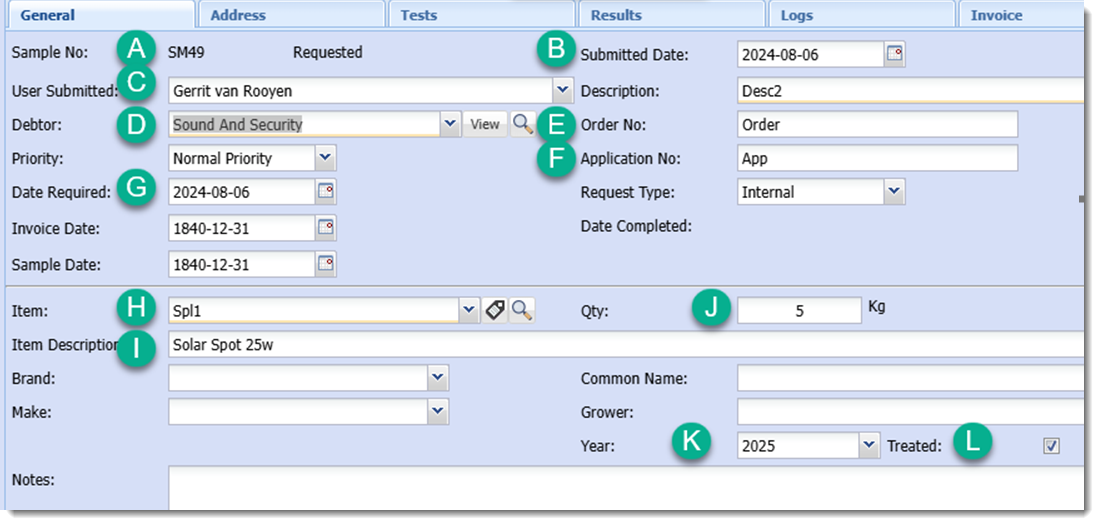
%SAMPLENO% |
%FIELD-A% %A% |
Sample Number | |
%SUBMITDATE% |
%FIELD-B% %B% |
Submitted Date | YYYY-MM-DD format |
%USER% |
%FIELD-C% %C% |
User Submitted | First and Last name |
%DEBTOR% |
%FIELD-D% %D% |
Debtor Name | |
%ORDERNO% |
%FIELD-E% %E% |
Order Number | |
%APPNO% |
%FIELD-F% %F% |
Application Number | |
%REQDATE% |
%FIELD-G% %G% |
Date Required | YYYY-MM-DD format |
%ITEM% |
%FIELD-H% %H% |
Item Code | |
%ITEMDESCR% |
%FIELD-I% %I% |
Item Description | |
%QTY% |
%FIELD-J% %J% |
Quantity | |
%QTYWUNIT% |
%FIELD-J2% %J2% %QTY-WITH-UNIT% |
Quantity with unit appended | |
%YEAR% |
%FIELD-K% %K% |
Year | |
%TREATED% |
%FIELD-L% %L% |
Treated | Shows as "Treated" if checkbox is ticked, otherwise blank |
[TODO restore Lab Tests section from ealier revision]
PT Job Item
| Placeholder | Alternative Placeholders | Description | Notes |
|---|---|---|---|
%PBAR% |
%PBARCODE% %PB% %PB1% |
Primary Barcode |
The value used depends on which Barcode Print button in the form is clicked. The Job Item Number is used when the button next to it is clicked, and the Barcode is used when the button next to it is clicked. |
%JOBITEM% |
%JOBITEM-NAME% %JI-NAME% %JI% %JI1% |
Job Item Name | |
%JOBITEMNUM% |
%JOBITEM-NUM% %JOBITEMNO% %JI-NUM% %JI2% |
Job Item Number | |
%LOC% |
%LOCATION% %L% %L1% |
Location Description | |
%LOCCODE% |
%LOCATION-CODE% %L2% |
Location Code | |
%QC% |
%QC-NAME% %QC1% |
Quality Control Description | |
%QCCODE% |
%QC-CODE% %QC2% |
Quality Control Code | |
%INSPBY% |
%INSPECTED-BY% %I% %I1% |
Inspected By Full Name | |
%INSPBYFN% |
%INSPECTED-BY-FNAME% %I2% |
Inspected By First Name | |
%INSPBYLN% |
%INSPECTED-BY-LNAME% %I3% |
Inspected By Last Name | |
%CUST% |
%CUSTOMER% %C% %C1% |
Customer Name | |
%CUSTCODE% |
%CUSTOMER-CODE% %C2% |
Customer Code | |
%DOCNUM% |
%DOCUMENT-NUM% %DOCNO% %DN% %DN1% |
Document Number | |
%LPLAN% |
%LPLANNING%%LP% %LP1% |
Location Planning Description | |
%LPLANCODE% |
%LPLANNING-CODE%%LP2% |
Location Planning Code | |
%GROUP% |
%G% %G1% |
Group Description | |
%GROUPCODE% |
%GCODE% %G2% |
Group Code | |
%REF% |
%REFERENCE% %R% %R1% |
Reference | |
%DESCR% |
%DESCRIPTION% %D% %D1% |
Description | |
%BAR% |
%BARCODE% %B% %B1% |
Barcode | |
%SERIAL% |
%SERIAL-NUM% %SERIALNO% %SN% %SN1% |
Serial Number |
Sales Order - Shipping
| Placeholder | Alternative Placeholders | Description | Notes |
|---|---|---|---|
%SONO% |
%SO% %SALESORDER% |
Sales Order Number | |
%ORDERNO% |
Order Number | ||
%CUST% |
%D% |
Customer Name | |
%PCL-CT% |
Parcel Count | ||
%PCL-N% |
Parcel Number |
||
%ADDR1% |
Address Line 1 | ||
%ADDR2% |
Address Line 2 | ||
%ADDR3% |
Address Line 3 | ||
%ADDR4% |
Address Line 4 | ||
%POST% |
Address Postcode | ||
%ADDR+1% |
Filled in Address Line 1 | Ignores preceding blank lines | |
%ADDR+2% |
Filled in Address Line 2 | Ignores preceding blank lines | |
%ADDR+3% |
Filled in Address Line 3 | Ignores preceding blank lines | |
%ADDR+4% |
Filled in Address Line 4 | Ignores preceding blank lines |
Notes
1. Accessories Grid size and layout
Sizing and layout can be determined by a sequence of table graphic commands directly following the command containing the placeholder. The size of the font in the table will be the size of the placeholder font. See the section Accessory Grid Printing for more details about Accessory Grid Printing.
2. Accessories Grid column placeholders
Placeholders for column values of the Accessories grid can be set in the template instead of setting ACCESORIES_GRID. The N is replaced with a number referencing the row in the grid, for instance ACC_CODE_01 references the Code value in first row.
3. Assets barcode placeholder
For barcode printing in the Assets Module the by default the placeholder BAR1 references the Asset Number of the item and the placeholder BAR2 references its Barcode. However, if the Print Barcode button in the General Tab of the Asset Details form is clicked, the values are interchanged, with BAR2 referencing the Asset Number.
Printing from Main Tab in Asset Details Form (Default Behaviour)
 [TODO restore or recreate]
Printing from General Tab in in Asset Details Form (Special Case)
 [TODO restore or recreate]
4. Print WHS Label option
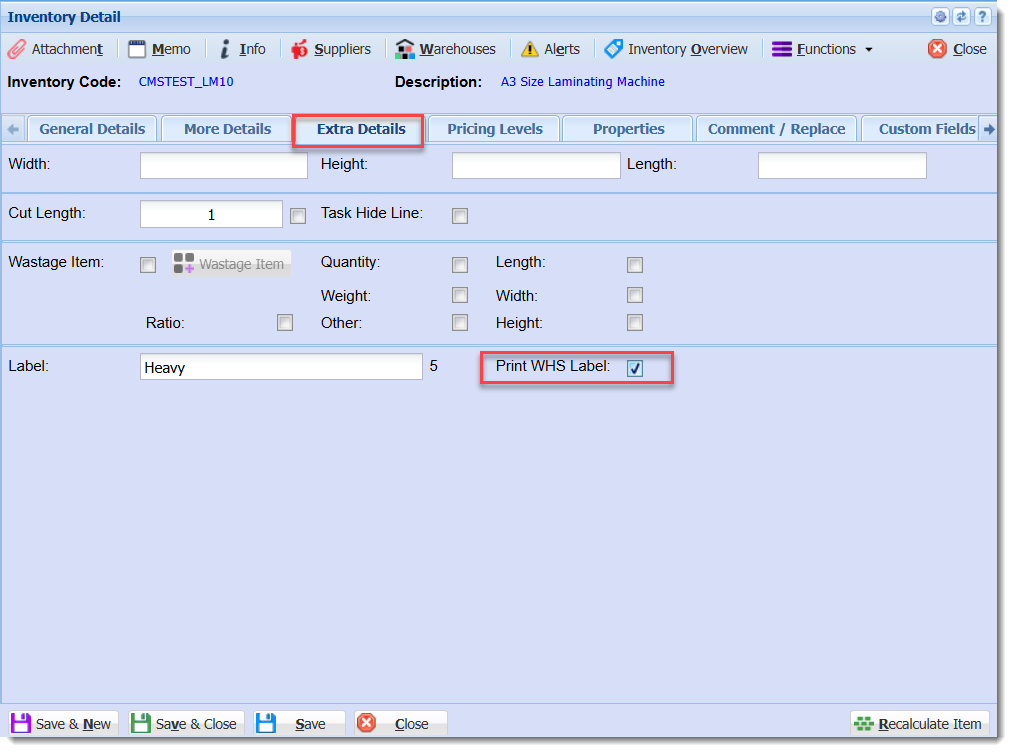
The placeholders %PRNWHSCODE% and %PRNWHSNAME% will have no effect unless the Inventory Item has the option "Print WHS Label" enabled in its setup form and there is at least one Warehouse with the option "Print On Label" enabled in its setup form, as shown.
Location of "Print WHS Label" option in Inventory Setup form
Location of "Print on Label" option in Warehouse Setup form
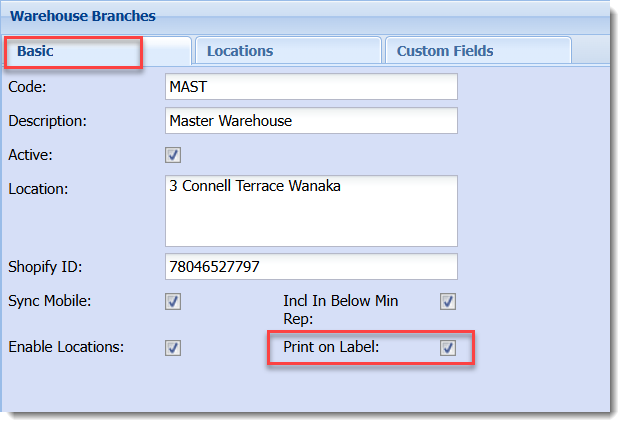
With both options enabled, the placeholders are substituted with values from the Warehouses, with additional labels being printed if there is more than one Warehouse with the "Print On Label" option enabled.
Lab Samples Markers
Accessory Grid Printing
To include a table with accessory data for an inventory item a placeholder that begins ACCESORIES_GRID is used or one of the alternate placeholders for it. Alternatively individual values can be referenced with the ACC_CODE_0N, ACC_DESCR_0N, ACC_QTY_0N, and ACC_REF_0N placeholders, where N is replaced with the row number of the table.
There is currently one type of accessories table available although more types can be added if required.
The data for the grid is found in the Inventory Setup window for an item, in the Manage Accessories form which is opened through the Functions menu.
 [TODO restore or recreate]
For the label commands of the table data to be generated successfully it is important that the table drawing commands in the template appear immediately after the ACCESSORIES_GRID1 placeholder label command.
 [TODO restore or recreate]
The spacing of the table is determined by the layout of the lines of the table in the template. The table can be drawn with the table drawing tool located in the left side bar in GoLabel II. Labels are placed at the top left corner of their corresponding cell. Headers are added automatically and are one font size larger than the font for the table data. There is by default a 20 dot indentation for the table values. Quantity values are right aligned, using white space characters, within the space of the widest quantity value.
If there is more data than there are rows drawn in the template table then the additional rows are added automatically based on the size of the last row.
 [TODO restore or recreate]
Without enough horizontal spacing the values in the table may overlap. Currently this issue is ignored but having extra horizontal space will help mitigate it. Limiting the number of characters and using a fixed width font may be one option to fix this in the future.
 [TODO restore or recreate]