
Inventory Item Search
Inventory > Configuration > Inventory Setup
In Inventory setup search, you will see two search tabs
| Basic Search tab | searches for existing items based on system fields. |
| Custom Search tab | if you have setup custom fields in your inventory, you can search for the items using the custom fields linked. |
Note: If you leave the fields blank it will bring back all Inventory codes which will be sorted in inventory code order alphabetically.
If you click on the column heads they will sort A-Z or Z-A.
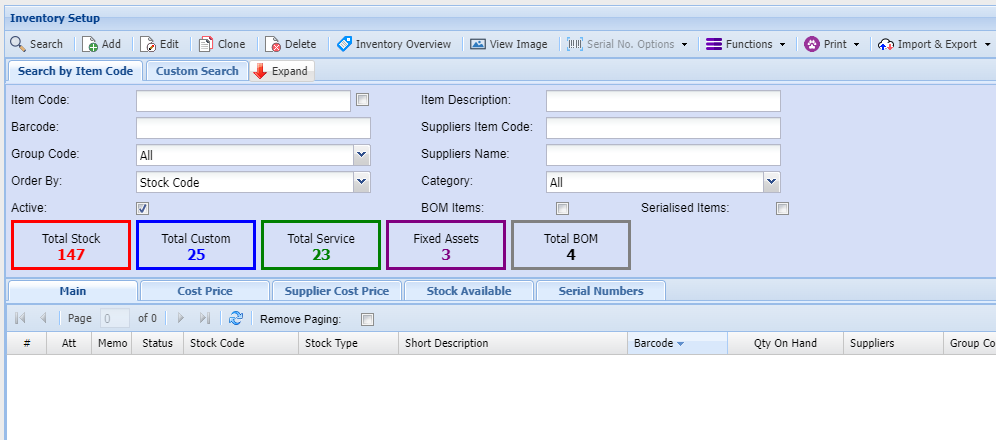
| Search Button | the search function will return Inventory Code records based on the search criteria entered. |
| Add Button | allows you to create an new Inventory item |
| Edit Button | allows you to edit an existing Inventory Code |
| Clone | clone an existing inventory code |
| Delete Button | allows you to delete an existing Inventory Code subject to certain rules |
| Inventory Overview button | provides an overview of all open transactions and quantity balances pertaining to the selected Inventory item |
| View Image | Displays an image of the item if one was uploaded |
| Functions drop down | allows you to update various settings on the items selected |
| Print Drop down | Allows you to print or export details of the items displayed in the grid based on search criteria selected. |
| Import & Export | allows you to import and export various item details, including master data, properties, bin locations. |
Search options
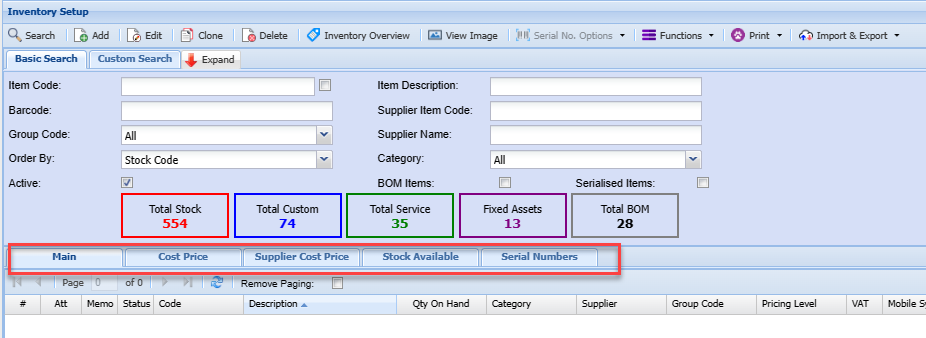
Enter any of the fields, such as the item code or part of the item description to limit your search to a specific item or range of items.
| Main tab | Displays basic information of the item within the grid |
| Cost Price tab | shows the item cost and selling price information of a selected item |
| Supplier Cost Price tab | shows various supplier cost prices of a selected item, including historic cost prices. |
| Stock Available tab | shows stock quantity levels of the item in various warehouses. |
| Serial Number tab | shows serial numbers for the selected item. This tab is only active if the item code is flagged for serial number tracking |