
Add Expense Setup
To add a new expense setup go to
General Ledger> Configuration> Expense Setup
First, you need to add the expense category
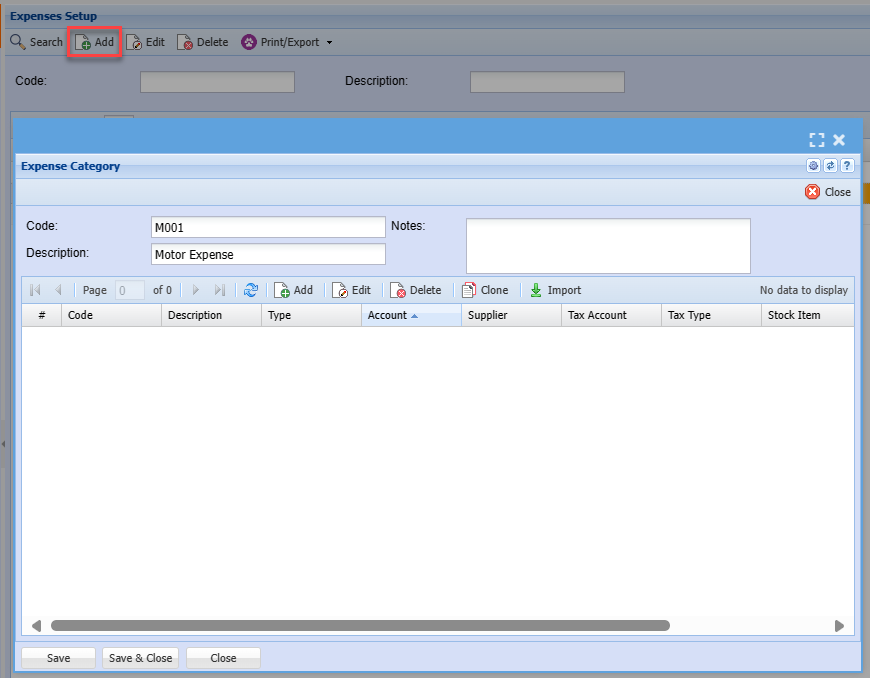
| Code | Enter expense category code |
| Description | Enter expense category name or description |
| Notes | Add notes regarding what the expense category will be used for |
Adding a new expense rule
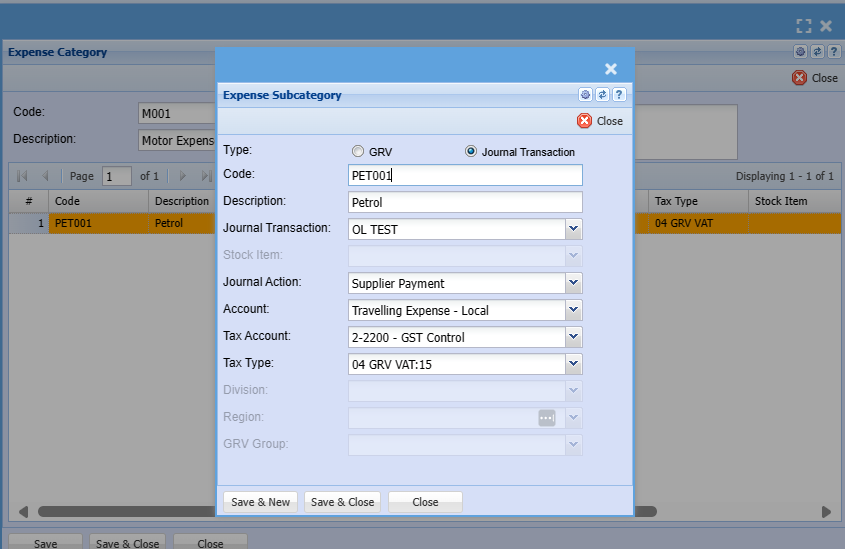
| Type | Select the type of entry to be created when a finance manager approves the expense claim |
| Code | Enter the code for the expense subcategory |
| Description | Enter the name or description of the sub category. This is the name that will appear on the expense sub category drop down |
| Journal Transaction | Journal Type is usually a supplier |
| Stock Item | Enter stock item to be used if transaction type is GRV |
| Journal Action | Select journal action on the drop down selection |
| Account | Select the account the journal or GRV needs to be posted in |
| Tax Account | Select VAT/GST account from the drop down selection |
| Tax Type | Select Tax/ GST Type from the drop down selection |
| Division | Select the division from the drop down selection if applicable |
| Region | Select the region from the drop down selection if applicate |
| GRV Group | Select GRV group from the drop down selection |
No Comments