
Debtor Functions Dropdown
Functions Dropdown
This dropdown defines actions against a Debtor or Customer
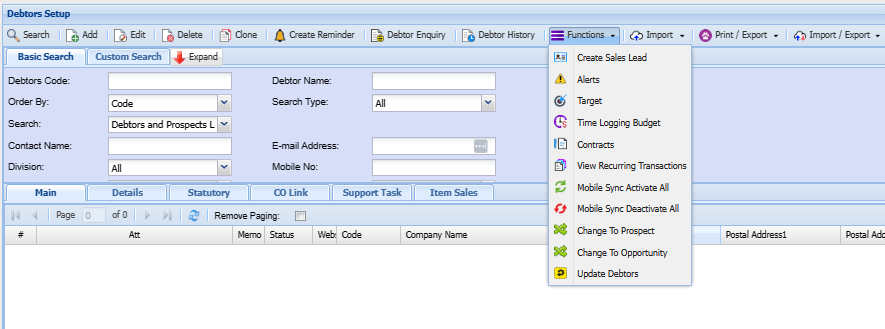
| Create Sales Lead | Allows you to easily create a sales lead from a debtor or customer screen if they want more business or services without having to recapture all information that already exisit within the system. |
| Alerts | |
| Target | Allows you to set monthly targets for the year |
| Time Logging Budget | |
| Contracts | |
| View Recurring Transactions | |
| Mobile Sync Activate All | |
| Mobile Sync Deactivate All | |
| Change to Prospect | |
| Change to Opportunity | |
| Update Debtors |
Create Sales Lead
Allows you to easily create a sales lead from a debtor or customer screen if they want more business or services without having to recapture all information that already exisit within the system.
Debtorsebtors module> Configuration>Debtors Setup > Create Sales leads
When this Function is Selected
It will turn add debtor under sales leads
.png)
.png)
When you click yes it will take you directly to the created sales Lead
.png)
Alert
Targets
TimeLogging Budget
Debtors module> Configuration>Debtors Setup > Time Logging Budget
| Add | allows the user to create a new time budget for a specific debtor. |
| Edit | allows the user to Change/ update the existing time budget. |
| Import | allows the user to import an existing time budget in a *.CSV file format. |
| Update grid | reloads the data to show new items |
| Active | Please tick to enable the use of the time budget. |
Columns
| Budget Qty = | Value entered manually based on contract |
| Actual Qty = | Checks the quantity done against clients based on time logs |
| Potential value = | the potential value that a consultant is able to bill on the client - should be able to |
| Actual Value = | calculated based on time logs with billing rate |
| Budget Value = | Value entered manually based on contract |
| Balance = |
Compares value Actual Value - Budget value and running as a running balance |
.png)
Add additional budget period month or months
.png)
Contracts
View Recurring Transactions
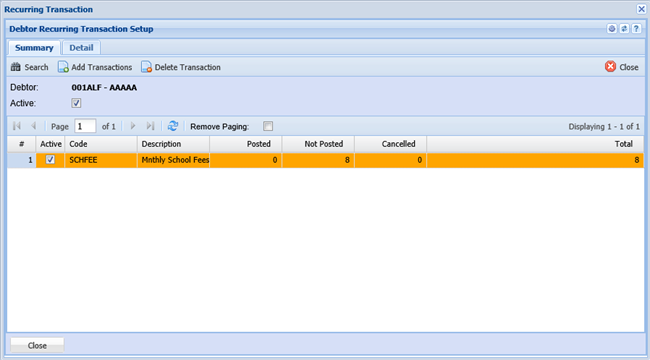
Debtors module> Configuration>Debtors Setup > View Recurring Transactions
This form when it opens lists all if any Recurring Transaction contracts that have been generated for this Debtor. The grid illustrates the Recurring Transaction Setup Code and Name as well as summary of the transactions for this Recurring Transaction Setup i.e. Posted transactions, Not Posted transaction, Cancelled transactions and the Total number of the transactions for this contract.
Insert clicking Insert will allow you to generate a range of transactions for this debtor based on criteria selected on the Insert form. Bear in mind all transaction generated from this action will have the status Recurring Transaction
Close closes this form.
Clicking on the Detail tab will list the following details of all the transactions for the selected contract.
Date for each transaction into the future.
Transaction Type
Status (Posted / Not Posted / Cancelled)
Processing Type (Automatic / Manual)
Document Number in the event of the transaction having been processed,
Description as it appears on the transaction i.e. Invoice Description
| View Transaction | Allows you to Edit (if not posted), View (if posted) the selected transaction |
| Change Status | When a range of invoices gets generated for a contract the Status of these invoices will be set to Recurring Transaction and cannot be posted with this status, therefore clicking this button will change the status to Preparation which the system can process. |
| Delete | Transactions with the status Recurring Transaction cannot be deleted from the normal grid view i.e. Invoice search grid, these transactions can only be deleted from this button. Clicking this button will result in this invoice being deleted and the status on this grid will be set to cancelled. |
Mobile Sync Activate All
Debtors module> Configuration> Extras
| Mobile Sync Allows | the activation of the mobile display of this item on the Webatar app. |
.png)
Mobile Sync Deactivate All
Debtors module> Configuration> Extras
| Mobile Sync Allows | the deactivation of the mobile display of this item on the Webatar app. |

Change to Prospect
Change To Opportunity
Debtors module> Configuration> Extras
Allows the debtor selected to be changed from debtor to Opportunity.
.png)
Update Debtors