Asset Actions Setup
Setup the various actions that can occur against an Asset for Asset item
To set an action against an asset go to
Asset Tracker Module> GeneralConfiguration> Asset Action
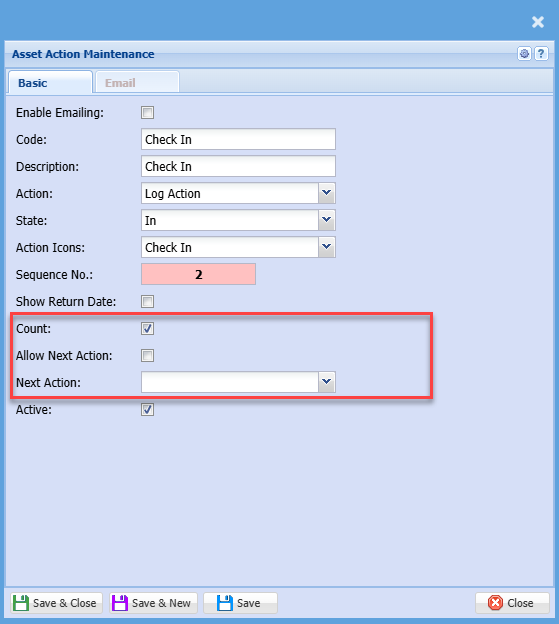
Then click add and the screen below will appear. To edit an asset action, highlight the asset action you want to edit then click edit
 .
.| Enable Emailing | |
| Code | |
| Description | |
| Action | |
| State | There are four states to which an asset can be assigned, |
| Action icons | Set up an icon for the action |
| Sequence No | This is the sort order for the action drop down (You may want more frequently used actions at the top of the list) |
| Show return date |
This When this is
|
| Active |
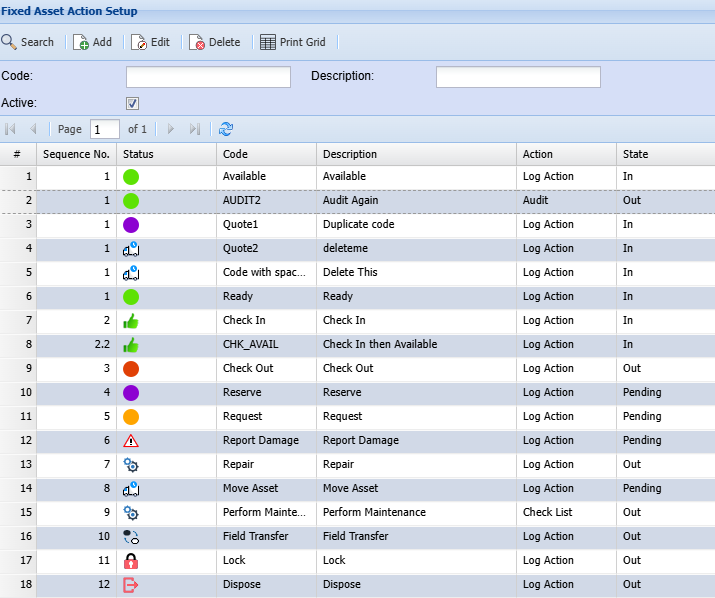
Asset Action Grid
Go through the various actions and clean up the actions that you will not be using .
We recommend the following actions remain in the system .system:
These
would be:
1.
2.in
3.Check
out
4.
5.
6.audit ,audit, it will mark the items as being audited)
7.
8.
New Asset Actions setup Features
.png)