
System Configuration Flow

Welcome to the System Configuration Module, the central administration area of Huge ERP. This module is designed to control and maintain the core settings that drive the operation of the entire ERP system. It provides administrators and authorised users with the tools required to configure company information, maintain security settings, manage users, define financial periods, set default system behaviour, and establish critical links between operational modules and the General Ledger.

The System Configuration Module serves as the foundation of Huge ERP, ensuring that all modules operate consistently and efficiently. Changes made within this module can affect system-wide functionality, making it one of the most important areas of the application. Proper setup and maintenance help ensure data accuracy, streamline business processes, improve security, and support organisational compliance requirements.

Within this module, users can manage company profiles, user accounts, security permissions, approval workflows, tax settings, pricing structures, email schedules, imports, integrations, and reporting access. The module is organised into five main menu groups:

  • Administration – Controls system-wide configuration settings and company setup.
  • General – Maintains users, pricing, tax structures, projects, and recurring information.
  • General Ledger Links – Defines how transactions from other modules are posted to the General Ledger.
  • Security – Manages permissions, approvals, favourites, dashboard settings, and access controls.
  • Reports – Provides access to configuration reports, security reports, dashboards, and document management functions.

Because many settings in this module affect the entire ERP environment, it is recommended that only authorised personnel make changes. Before updating configuration settings, users should ensure they understand the impact these changes may have on business processes and other system users.

By maintaining accurate configuration settings, organisations can maximise the efficiency, security, and reliability of their Huge ERP environment.
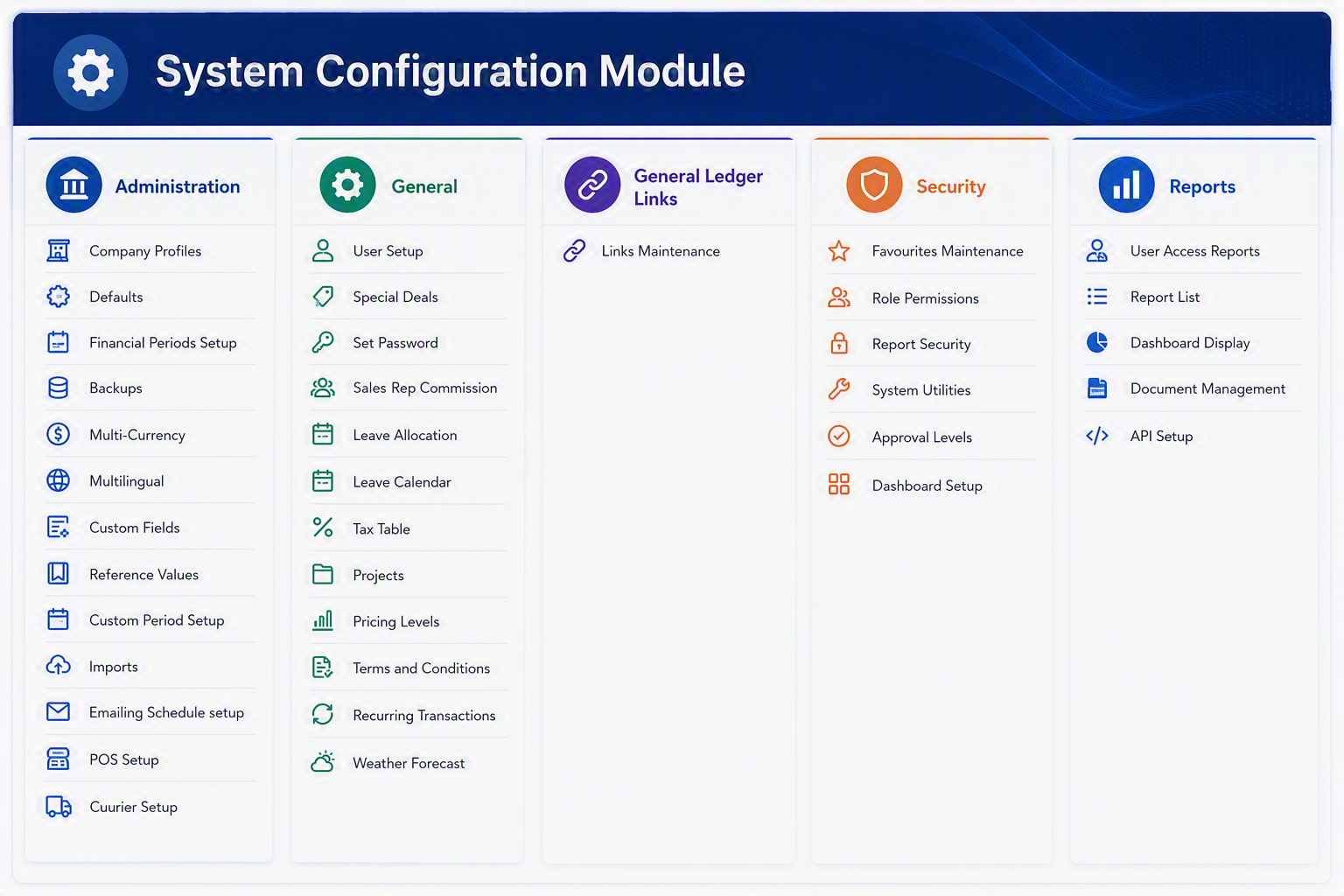
System Config Module.png


System Configuration Module Menu Items

Administration
Menu ItemExplanation
Company ProfilesUsed to maintain core company information such as company details, trading information, contact details, and setup values used throughout the system.
DefaultsAllows default system settings to be defined so that common values are automatically applied when transactions or records are created.
Financial Periods SetupUsed to create, manage, and control the financial periods used for accounting, reporting, and transaction processing.
BackupsProvides access to backup-related settings or processes to help protect system and company data.
Multi-CurrencyUsed to configure and manage currency settings where transactions may be processed in more than one currency.
MultilingualAllows language-related settings to be maintained where the system supports users working in different languages.
Custom FieldsUsed to define additional fields that can be added to records where extra company-specific information needs to be captured.
Reference ValuesAllows standard lookup values and predefined lists to be maintained for consistent data entry across the system.
Custom Period SetupUsed to configure additional or specialised period structures where standard financial periods are not sufficient.
ImportsProvides access to import setup or import routines used to bring external data into the Huge ERP system.
Emailing Schedule SetupUsed to configure scheduled email settings for system-generated email processes or recurring email activities.
POS SetupAllows Point of Sale related settings to be configured where POS functionality is used within the system.
Courier SetupUsed to maintain courier-related settings and options for delivery or dispatch processes.

General
Menu ItemExplanation
User SetupUsed to create and maintain user accounts, including user details and general access setup.
Special DealsAllows special pricing, promotions, or deal-related settings to be configured where applicable.
Set PasswordUsed to set or update user passwords, depending on the security permissions available to the user.
Sales Rep CommissionAllows commission rules or commission-related settings for sales representatives to be maintained.
Leave AllocationUsed to manage leave allocation settings where employee leave balances or allowances are maintained in the system.
Leave CalendarProvides a calendar view or setup area for leave-related information and scheduling.
Tax TableUsed to maintain tax codes, tax rates, or tax-related setup values used when processing transactions.
ProjectsAllows project records or project-related settings to be created and maintained for reporting or transactional use.
Pricing LevelsUsed to configure different pricing levels that may be applied to customers, products, or sales transactions.
Terms and ConditionsAllows standard terms and conditions to be maintained for use on documents, transactions, or system outputs.
Recurring TransactionsUsed to configure transactions that need to be repeated on a regular basis.
Weather ForecastProvides access to weather forecast information where this is linked to operational or planning activities.

Menu ItemExplanation
Links MaintenanceUsed to maintain links between system activities and the General Ledger, ensuring that transactions post to the correct ledger accounts.

Security
Menu ItemExplanation
Favourites MaintenanceAllows frequently used menu items or shortcuts to be maintained for easier user access.
Role PermissionsUsed to define what each user role is allowed to access or perform within the system.
Report SecurityControls access to reports, helping ensure users can only view reports they are authorised to access.
System UtilitiesProvides access to utility functions used for system maintenance, support, or administrative tasks.
Approval LevelsUsed to define approval limits or approval stages for workflows that require authorisation.
Dashboard SetupAllows dashboard views, layouts, or dashboard-related settings to be configured for users or roles.

Reports
Menu ItemExplanation
User Access ReportsProvides reports showing user access, permissions, or security-related information.
Report ListDisplays the available reports within the system or within the selected module.
Dashboard DisplayUsed to view or manage dashboard-style reporting and summary information.
Document ManagementProvides access to document storage, document references, or document-related reporting functions.
API SetupUsed to configure API-related settings where Huge ERP connects to external systems or services.


Brief Manual Description

The System Configuration Module is used to manage the central setup areas of Huge ERP. This module controls key system settings such as company profiles, user setup, security permissions, financial periods, tax tables, pricing levels, email scheduling, imports, POS setup, and reporting access. It is normally used by administrators or authorised users to configure how the system operates, control access, and maintain the core information required by other modules.
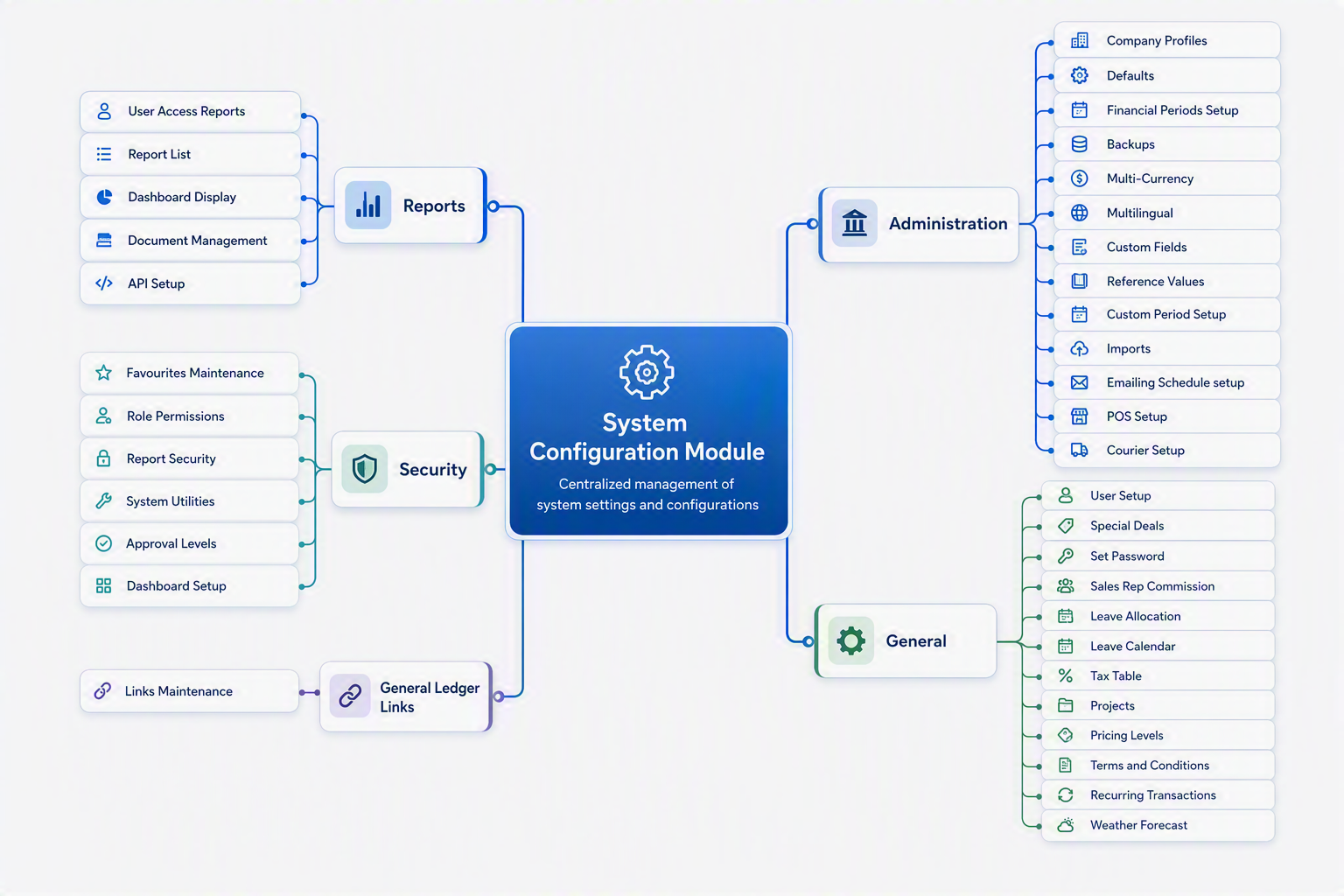
 

System Config Module map.png