Creditors Flow Line

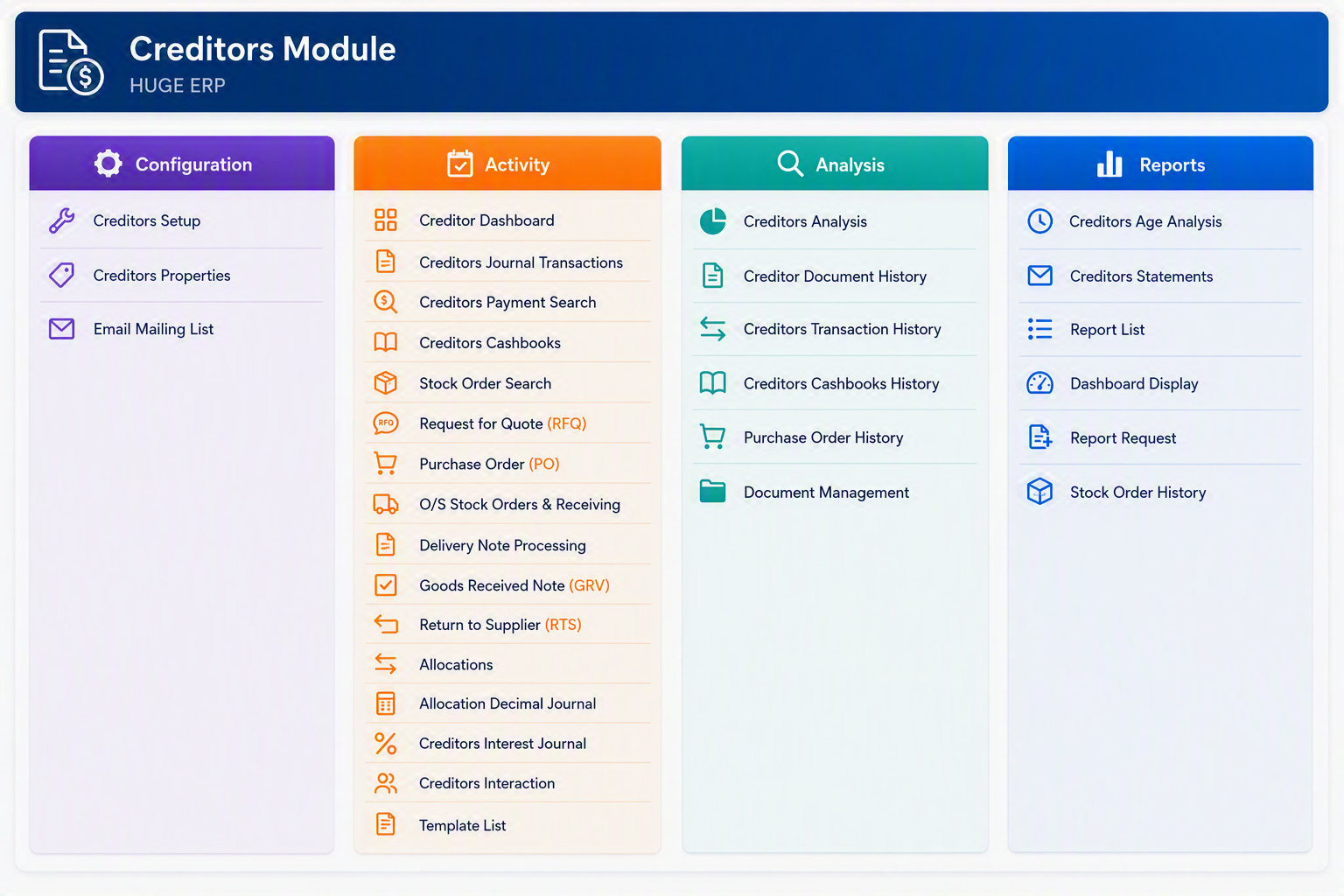
The Creditors Module in Huge ERP is used to manage supplier accounts, purchase-related transactions, payments, allocations, document history, and creditor reporting. The module is divided into four main menu groups: Configuration, Activity, Analysis, and Reports. Configuration is used to maintain the setup and system rules for creditors. Activity is used for day-to-day processing such as purchase orders, goods received notes, supplier returns, allocations, and creditor journals. Analysis provides access to historical transactions, documents, and purchasing information. Reports provides formal creditor reporting such as age analysis, creditor statements, dashboards, and stock order history.

Creditors Module.png

Creditors Module - Configuration
Menu Item Description
Creditors Setup Configure the primary settings used for supplier accounts, creditor transactions, payment processing, and reporting.
Creditors Properties Maintain creditor defaults, control settings, and processing rules used throughout the Creditors Module.
Email Mailing List Manage supplier email addresses and mailing lists used for statements, remittances, and correspondence.


Creditors Module - Activity
Menu Item Description
Creditor Dashboard View key creditor information, outstanding balances, and supplier activity in a single dashboard.
Creditors Journal Transactions Process creditor journals, adjustments, and accounting corrections.
Creditors Payment Search Search and review historical supplier payments and payment details.
Creditors Cashbooks Process and review creditor-related cashbook transactions.
Stock Order Search Search for stock orders linked to suppliers and purchasing transactions.
Request for Quote (RFQ) Create and manage requests for quotations from suppliers before issuing purchase orders.
Purchase Order (PO) Create, maintain, and process purchase orders issued to suppliers.
O/S Stock Orders & Receiving Review outstanding stock orders and manage the goods receiving process.
Delivery Note Processing Process supplier delivery notes and match deliveries to purchase orders.
Goods Received Note (GRV) Record goods received from suppliers and update inventory and creditor records.
Return to Supplier (RTS) Process stock returns and supplier return transactions.
Allocations Allocate invoices, payments, credit notes, and other creditor transactions.
Allocation Decimal Journal Process rounding and decimal balancing journals resulting from allocations.
Creditors Interest Journal Process interest charges and interest-related adjustments on creditor accounts.
Creditors Interaction Record and review supplier communications, notes, and interactions.
Template List Maintain document and communication templates used within the Creditors Module.


Creditors Module - Analysis
Menu Item Description
Creditors Analysis Analyse supplier balances, transactions, and purchasing activity.
Creditor Document History Review historical creditor documents, including invoices and supporting records.
Creditors Transaction History View a complete history of supplier transactions and account movements.
Creditors Cashbooks History Review historical creditor cashbook entries and payment activity.
Purchase Order History Access historical purchase orders and purchasing records.
Document Management Store, retrieve, and manage creditor-related electronic documents.


Creditors Module - Reports
Menu Item Description
Creditors Age Analysis Produce aged creditor reports showing outstanding balances by ageing period.
Creditors Statements Generate detailed supplier statements showing balances and transaction activity.
Report List Access the available reports within the Creditors Module.
Dashboard Display Display graphical and summary information relating to creditors and supplier activity.
Report Request Generate, queue, print, or export creditor reports.
Stock Order History Produce reports showing historical stock orders and supplier purchasing activity.


Creditors Module Overview

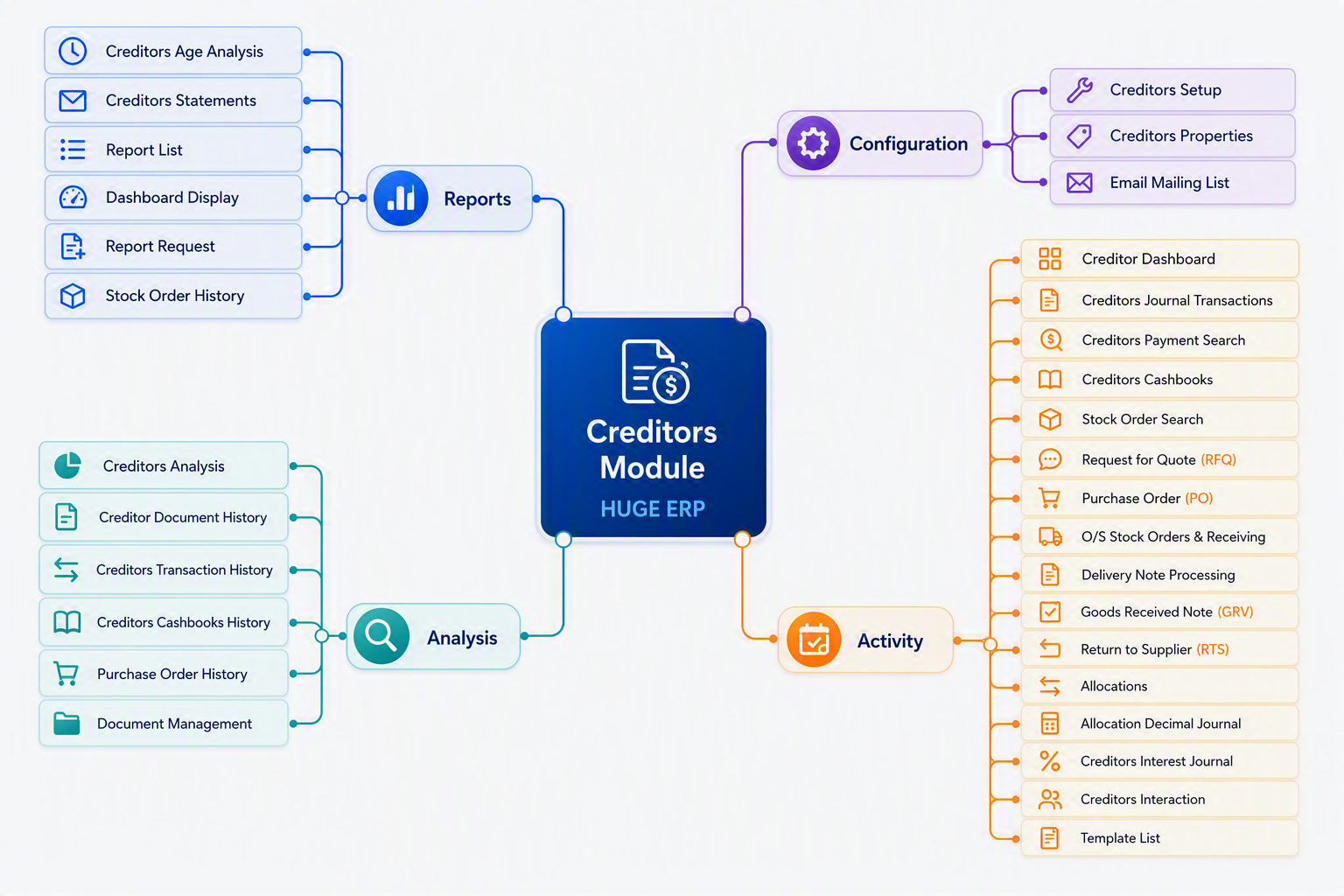
The Creditors Module is used to manage supplier accounts, purchasing activities, goods receiving, creditor payments, allocations, and supplier reporting. The module is divided into four menu groups:
Menu Group Purpose
Configuration Maintain system settings and creditor master setup information.
Activity Perform daily supplier processing, purchasing, receiving, and payment transactions.
Analysis Review historical transactions, documents, and purchasing information.
Reports Produce creditor reports, statements, dashboards, and analysis reports.

Creditors Module map.png


Creditors Purchasing Flow Overview

The Creditors Purchasing Flow illustrates the complete purchasing lifecycle within the Huge ERP Creditors Module, from supplier setup through to payment and reporting. It provides a visual guide to the key processes used when purchasing goods and services from suppliers and managing creditor accounts.
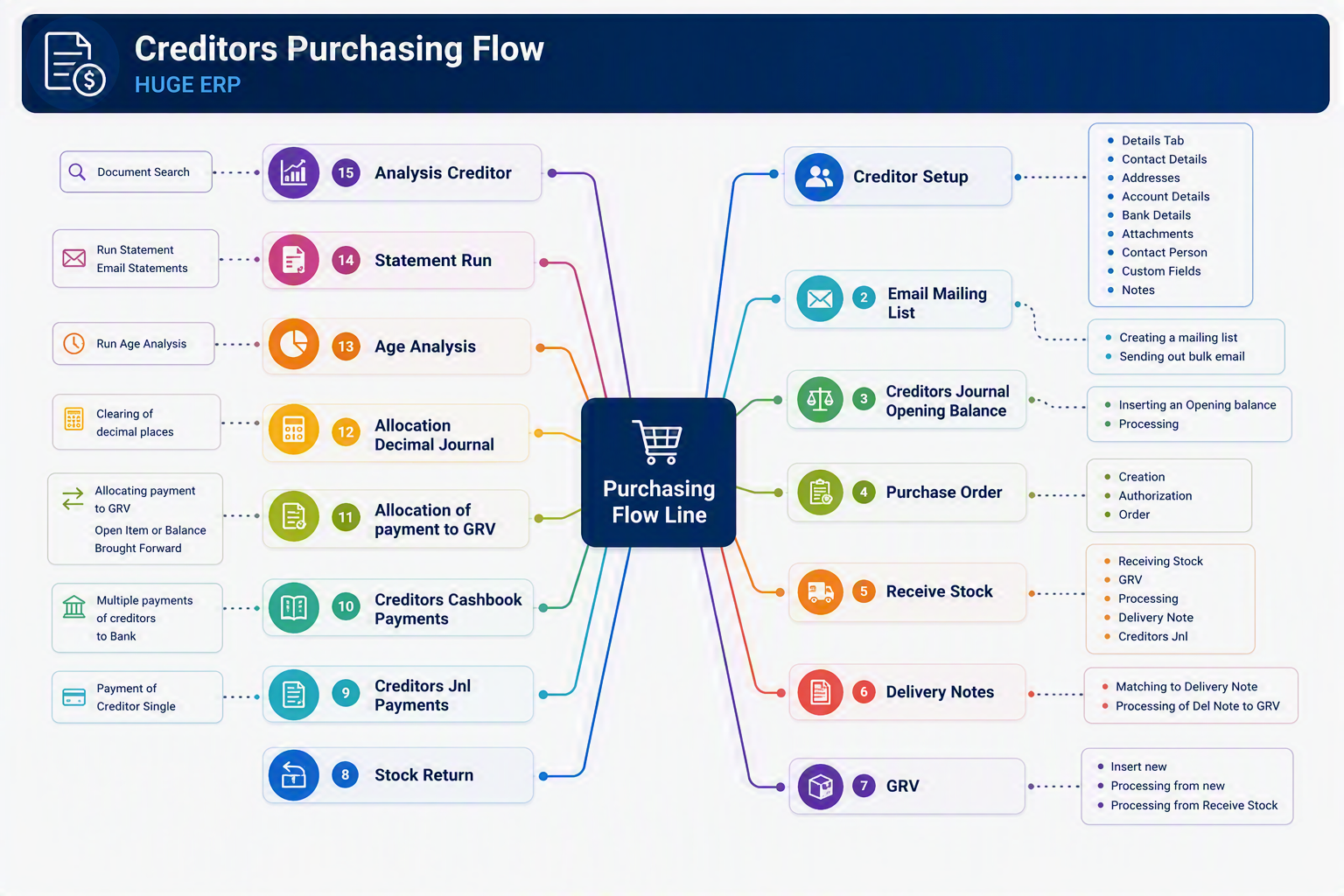
Creditors Purchasing Flow.png


Flow Summary
  1. Creditor Setup

    • Create and maintain supplier records.
    • Store contact details, addresses, bank details, attachments, contact persons, custom fields, and notes.
  2. Email Mailing List

    • Maintain supplier email distribution lists.
    • Send bulk communications or supplier notices.
  3. Creditors Journal Opening Balance

    • Enter opening balances when implementing the system.
    • Record historical creditor balances brought forward.
  4. Purchase Order (PO)

    • Create and authorise purchase orders.
    • Generate formal orders for suppliers.
  5. Receive Stock

    • Record the arrival of goods from suppliers.
    • Capture received quantities prior to invoice processing.
  6. Delivery Notes

    • Process supplier delivery notes.
    • Match delivered goods against purchase orders and receipts.
  7. Goods Received Voucher (GRV)

    • Confirm goods received into inventory.
    • Create the accounting transaction that links purchasing and creditors.
  8. Stock Return

    • Return damaged, incorrect, or surplus stock to suppliers.
    • Adjust inventory and supplier balances accordingly.
  9. Creditors Journal Payments

    • Process individual supplier payments via creditor journals.
  10. Creditors Cashbook Payments

    • Generate and process multiple supplier payments.
    • Transfer payments through bank processing and cashbooks.
  11. Allocation of Payment to GRV

    • Match supplier payments against invoices and GRVs.
    • Clear outstanding creditor balances.
  12. Allocation Decimal Journal

    • Handle rounding differences and minor allocation variances.
  13. Age Analysis

    • Review outstanding creditor balances by ageing period.
    • Identify suppliers requiring payment.
  14. Statement Run

    • Produce creditor statements.
    • Email statements directly to suppliers if required.
  15. Analysis Creditor

    • Access historical creditor transactions.
    • Review documents, balances, purchasing history, and supplier activity.

Typical Purchasing Process

For most organisations the purchasing cycle follows this sequence:

Creditor Setup → Purchase Order → Receive Stock → Delivery Note → GRV → Supplier Payment → Allocation → Age Analysis → Reporting

This process ensures that:

  • Goods received are matched to purchase orders.
  • Supplier invoices are correctly recorded.
  • Payments are allocated accurately.
  • Creditor balances remain up to date.
  • Complete audit trails are maintained throughout the purchasing cycle.
Business Benefit

The Creditors Purchasing Flow provides full control over supplier purchasing, inventory receipts, invoice matching, payment processing, and creditor analysis, ensuring accurate financial records and improved supplier management throughout the organisation.