
Lab Test Window
This is the window that holds all the information on the lab test
There are a couple of tabs
Tab Explanation
| Tab Name | Description |
| General | Displays the main information of the Lab test required |
| Address | Gives the information on the customer and cost center information |
| Tests | Displays all the required tests |
| Other | Information to be filled in on the test |
| Results | Displays all the tests that are have been published to the requester |
| Logs | Displays all the logs and actions that have occurred on the lab test |
| Charges |
Shows what is charged for on the Lab test This can be converted to an invoice |
General Tab
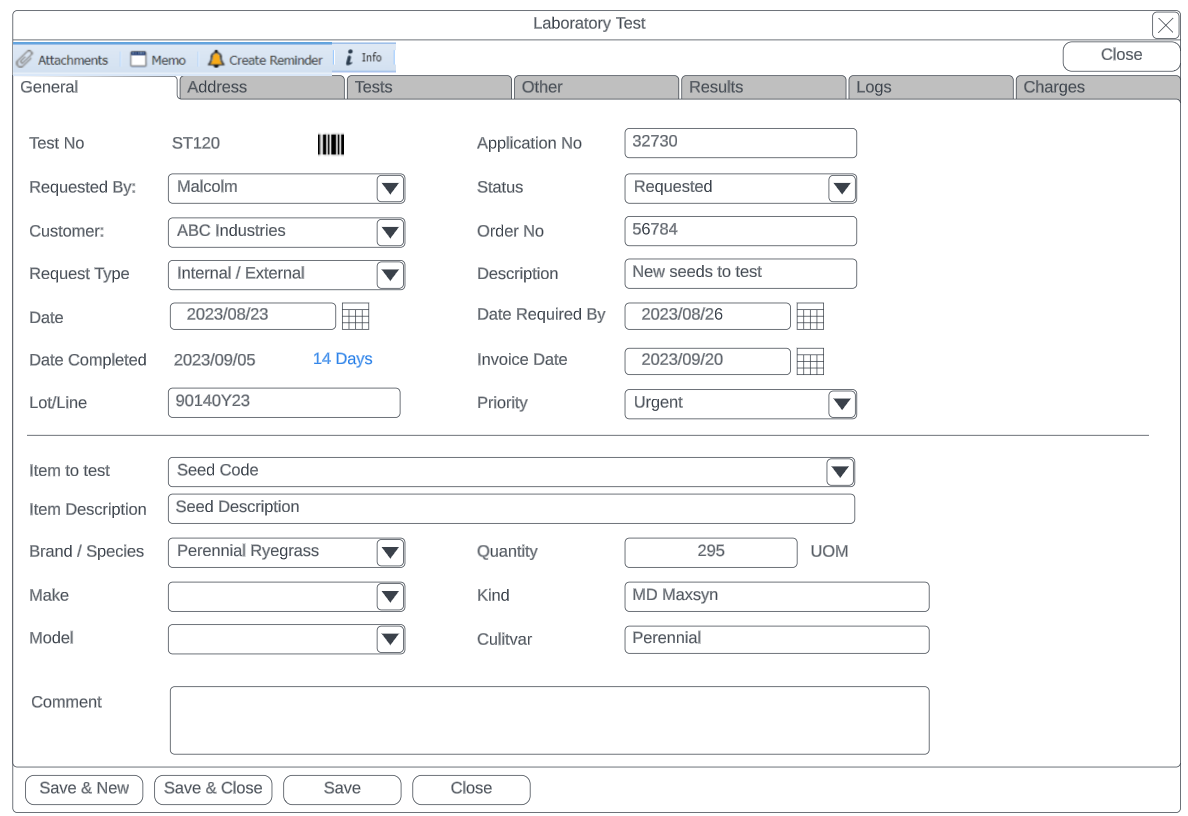
| General Tab | Details |
| Test No | Displays the Lab unique test number |
| Barcode button | Button of barcode to allow for barcode printing of Lab test number |
| Application number | The application number the user entered |
| Requested by | The name of the user who requested the lab test |
| Status |
The status of the lab test Requested (Gray), Received (Yellow), In progress (Green), Certificate Issued (Blue), Completed (Blue), Cancelled (Red), Closed (Red) |