Keyboard shortcut keys
Video training manual 2019 - Click Here
The system caters for shortcut keys so as to reduce the use of the mouse
See below shortcut keys
Basic keys
| Move between fields | Tab | Buttons and fields |
| Backwards move | Shift + Tab | Buttons and fields |
| Add | Insert | Add |
| Delete line record | Delete | Delete record |
| Help | Alt + |
Help manual |
|
Select record |
Enter |
Select record in dropdown Select button Run search in search window |
|
Move in dropdown |
Up and down arrow keys |
Move in dropdown |
Function keys
|
Search |
Alt + F |
Find |
|
Add |
Alt + A |
Add |
|
Quick Add |
Alt +Q |
Quick Add |
|
Edit |
Alt + E |
Edit |
|
Delete |
Alt + X |
Delete Button |
|
Save |
Alt + S |
Save |
|
Close |
Alt + C |
Close |
|
Save and Close |
Alt + Y |
Yes |
|
Save and New |
Alt + N |
New |
|
|
Alt + P |
|
|
Tabs - Tab 1 Main |
Alt + 1 |
|
|
Tabs - Tab 2 |
Alt + 2 |
|
|
Tabs - Tab 3 |
Alt + |
|
|
Tabs - Tab 4 |
Alt + |
|
|
Tabs - Tab 5 |
Alt + |
|
|
Tabs - Tab 6 |
Alt + |
|
|
Tabs - Tab 7 |
Alt + |
|
|
Tabs - Tab 8 |
Alt + |
|
|
Memo |
Alt + M |
Memo |
|
Attachment |
Alt + D |
Document |
|
Reminder |
Alt + R |
Reminder |
|
Process |
Alt + G |
Go |
|
First button row |
Alt + 0 |
Focus on Attachment or first button on top row |
|
Function button row |
Alt + 9 |
Focus on Add |
|
First grid line focus |
Alt + |
Highlights First Line on the Grid |
|
Close Button Focus |
Alt + T |
Focus on Close Button |
|
Authorise Sales Order |
Alt + Z |
Authorise document |
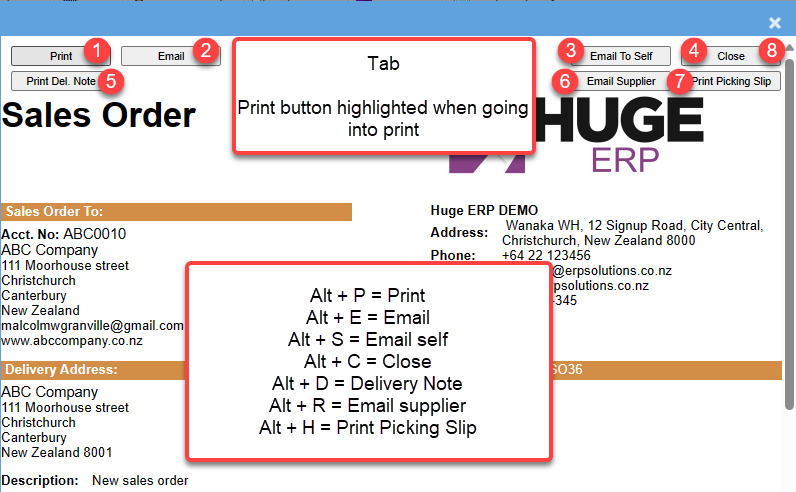
Print Keys
Focus on Print - click enter to print
| Alt + P | ||
| Alt + E | ||
| Email Self | Alt + S | Email Self |
| Close | Alt + C | Close window |
| Delivery Note | Alt + D | Print delivery note |
| Email Supplier | Alt + R | Email supplier |
| Picking Slip | Alt + H | Print Picking Slip |