
12. Projected Values
Job Costing>Reports>Reports List
This report is the same as the above report except that this compares different types example.
Also gives a percentage completion
Excellent to view from quote to Actual completed.
a. Budget vs Actual
b. Budget vs Invoiced
c. Actual vs Invoiced
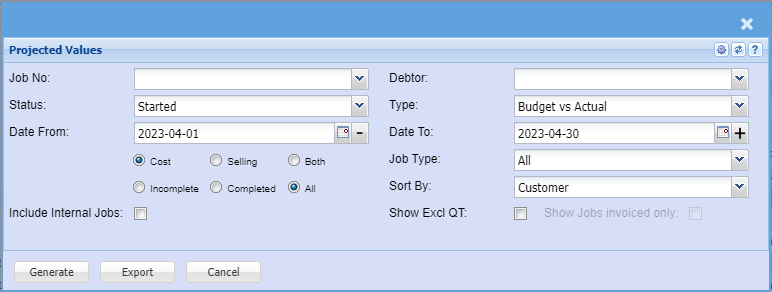
Same as projected values report with completion percentage.
To run the report, select from the following fields:
Debtor – select the debtor or leave it blank
Job Number – select the job number or leave it blank
Status – select the status from the drop down arrow
Date From – select the date from and the date to
Select either cost or selling
Type – select the type from the drop down arrow
Sort By – sort the report by selecting a customer, date, description, job number or quote
number from the drop down arrow.
Select to run Incomplete or Complete or All reports the reports
Generate button – to run the report
Close button – to close the report