
(00) Overview of Costs and Expenses on a Job
Job Costing> Reports> Reports List
This report can be run by selecting a Job Number range, a Debtor range or a Date range as the selection criteria working in conjunction with the Job Status options available in the Job Status drop down.
Please Note : When a Job Number range is selected the Date range is disabled.
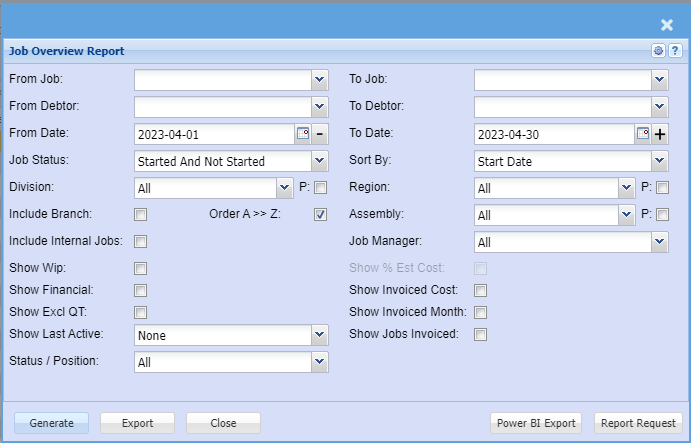
| From Job / To Job | |
| From Debtor / To Debtor | |
| From Date / To Date | |
| Job Status | |
| Division |
Division, region and assembly have options to filter by these cost centres. |
| Include Branch | display branch as a column on the report |
| Include Internal Jobs | This is a flag on the job, by default we exclude internal jobs on report. Put tick on to include them in report |
| Show Wip |
Future Managed Costs on Job – This displays areas in the system that has a job linked to it that has not yet been added to job. a. It looks at documents that are in process or in preparation |
| Show Financial | Shows columns related to sales figures on the job |
| Show Excl QT |
This is a flag on the quotes which flags that the quote values for sell and cost should not be part of the calculation for budget. |
| Show Last Active | |
| Status / Position | |
| Sort By | |
| Region | Division, region and assembly have options to filter by these cost centres. a. There is a P next to each with a tick box which stands for Print – Show as a column on the report to display the relevant cost centre |
| Assembly | Division, Region and Assembly have options to filter by these cost centres. a. There is a P next to each with a tick box which stands for Print – Show as a column on the report to display the relevant cost centre |
| Job Manager | |
| Show % Est Cost | Shows the percentage cost figures from percentage invoices as columns on the report |
| Show Invoiced Cost | displays new columns on the report to show invoiced costs |
| Show Invoiced Month | |
| Show Jobs Invoiced |
- Start date – the start date of the job
2. Est Start Date – Estimated start date which is used to work out the task activities
3. Comp Date – Completion date – the date you want the job to finish – lets say Friday because on Monday to delivery
4. Del Date – Delivery date – the date you want to the job to be delivered
5. Days – the outstanding days from today to completion date
6. Project Manager – the project manager assigned to the job
7. Debtor code – the customer code
8. Debtor name – the customer name
9.Job No – The job number – click on this number to open up the manage job screen
10. Description – the short description of the job
11. Job status – the status of the job – Non Started, Started, Completed, cancelled or closed
13. % Complete – the percentage of completion of the job – Budget versus managed
14. Order No – The customer order number
15. Quote No – The original quote number - Order value - This is the quote sell value of all quotes (excluding quotes flagged as excluded)
2. Planned cost - This is the quote cost value of all quotes (excluding quotes flagged as excluded)
3. Planned Profit - This is the profit of the quote = Order value - Planned cost
4. Managed – Total managed on job – actual managed items
5. Total – The total managed WIP = Future WIP + Total managed
6. Incurred Costs – Displays values of cashbooks and creditors journals linked to the job
7. Job del note – the value of cost in Job delivery note before Job invoice
a.once the delivery note is processed to invoice, value is taken out of this column
8. Job Invoice – the cost of job invoices via Usage job invoice or Percentage job invoice
a.If job is usage – total usage value on invoices processed
b. If job is percentage – the estimated percentage cost value entered by the user
9. Debtor invoice – the cost of the customer invoice done linked to the job
10. Credit note – the cost value of the credit note linked to the job.
| A | Order Value | Selling Value of the quote. |
| B | Planned Cost | Costs as per the quote. |
| C | Profit | Difference between the Order Value and the Planned Cost. |
| D | Stock Requests | All cost values of Stock Requests with the status Requested or Authorised. |
| E | Outstanding Purchase Orders | All cost values of Purchase Orders with the status Created or Authorised. |
| F | GRV To Job | All cost values of GRVs with the status Preparation or Posted. |
| G | Del. Note To Job | All cost values of Delivery Notes with the status Created. |
| H | BOM | All cost values of a BOM item with the status Created, Pending or Active. |
| I | Picking Slips | All cost values of items on Picking Slips that have not been managed. |
| J | Time Sheet WIP | All cost values of items on Job Capture that have not been processed. |
| K | Managed | All cost values of items on a Job that have been managed. |
| L | TOTAL | Sum of A, B, C, D, E, F, G, H, I, J and K |
| M | Incurred Costs | All GL Cash Books and Creditor Journals that have been posted linked to the job. |
| N | Job Delivery Note | All cost values of items on a Job Delivery Note. |
| O | Job Invoice | All cost values of items on a Job Invoice. |
| P | Debtor Invoice | All cost values of items on a Debtor Invoice with the status Posted. |
| Q | Credit Note | All cost values of items on a Debtor Credit Note with the status Posted |
| R | Outstanding Turn Over | A - (O + P - Q) |
| S | Future Costs | B – L |
| T | Future Profit | B – K |