
Warehouse Levels
Inventory module> Reports> Reports List
Allows a selection of minimum, maximum, and reorder level quantities which is setup in the inventory warehouse setup. Gives the quantity needed inat different levels.
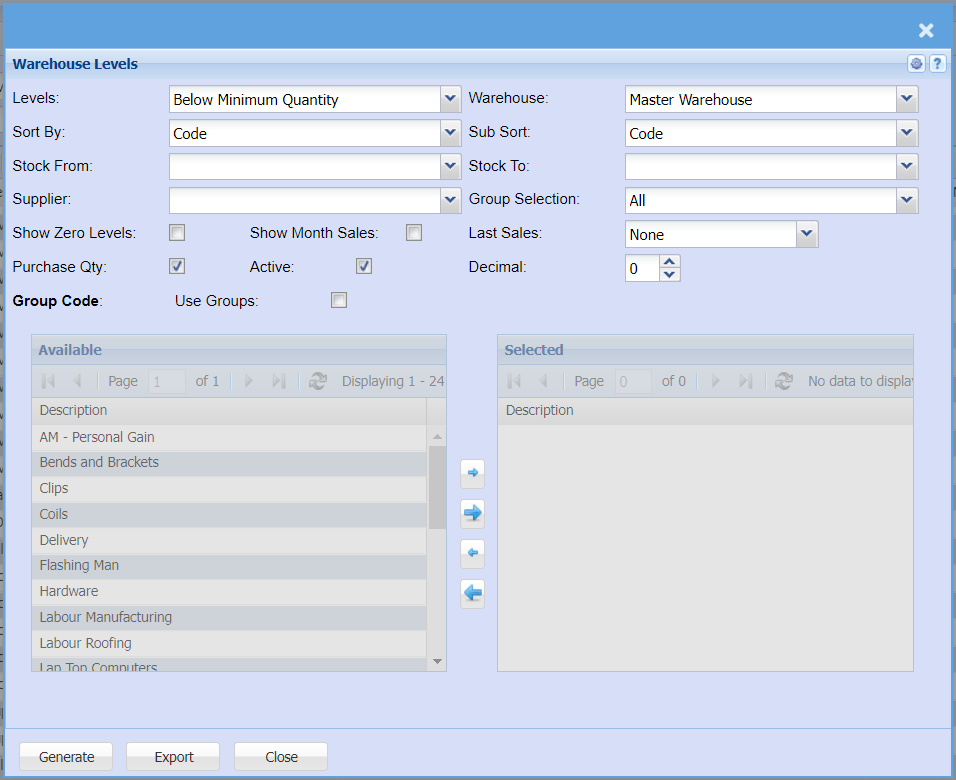
To generate the report, select options from the following fields below.
| Levels | |
| Sort By | |
| Stock From | If you leave the stock If you choose specific stock items, the report will sort information by stock item code rather than description |
| Supplier | Filter report by the supplier if you want to pull report by a specific supplier Leave this section black if you want to pull the report on all customers |
| Show Zero Levels | If you put the tick on, it will display all levels including levels with zero quantity If you don't the tick on the report will exclude all items with zero |
| Purchase Qty | Put a tick on if you want the report to display the purchase qty |
| Show Month Sales | Put a tick on if you want your report to display month sales |
| Active | |
| Last Sales | If you want to see all warehouse levels click leave selection to none Select a last sales from the drop down if you want to search by specific last sales |
| Decimal | It is advisable to set decimals to two places You can view the report with any number of decimal places. |
| Warehouse | |
| Sub Sort | |
| Stock To | |
Put a tick on if you want to pull a report by groups |
|
Select a group selection on the drop down |
|
Click the "Generate" button to open the report You will have options to copy, email, or print the report To view the report in an Excel document, copy the report and paste it into an Excel file |
|
| Export Button | This allows you to export the report to Exel |