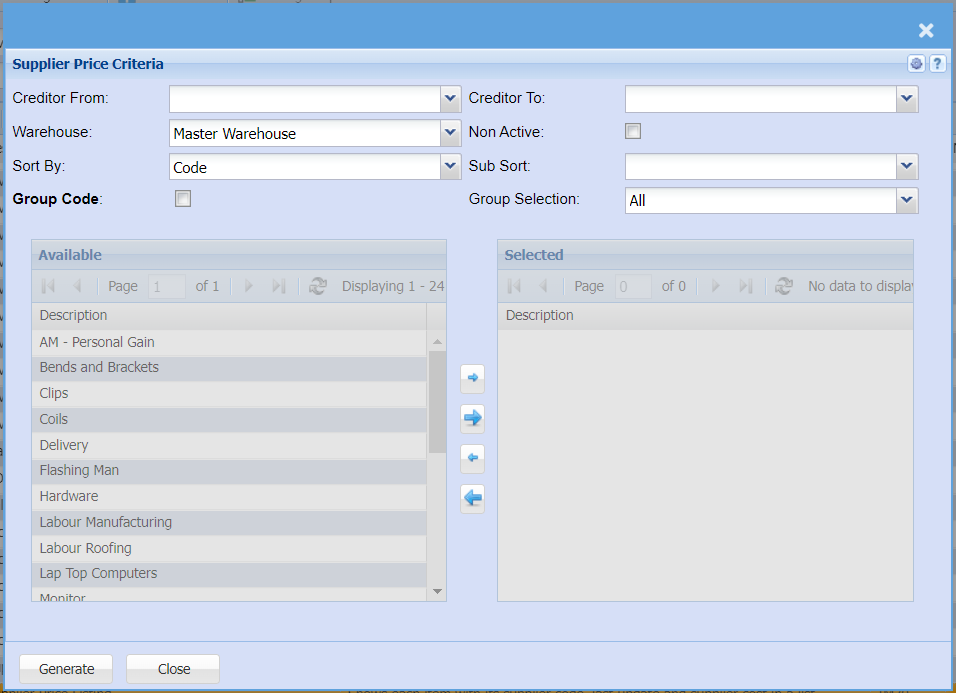
Supplier Price Listing
Shows each item with its supplier code, last update and supplier cost in a list.
Inventory module> Reports> Reports List
| Creditor From / To |
Select a supplierCustomer/Debtor you wantwish to view a price list for
If you leave creditor/supplier from fields blank, all supplier/creditors price listing will be displayed on the report
If you choose a specific creditor/ supplier, the report willfrom.
sortSelect informationthe byCustomer/Debtor creditor/supplieryou codewish andto notsee creditor/up supplierto namein the report.
|
| Warehouse |
SelectIf you select all warehouses the report will fetch data from all warehouses.
If you want to search by a specific warehouse, select the warehouse from the drop down arrow
Search by all if you want to see all supplier pricing list on all warehouses
menu. |
| Sort By |
Sort the report by selecting one option from the drop drop-down arrowmenu
|
| Group Code |
Put a tick on if you want to pull a report by groups |
Creditor To |
Select a customer too for the report
If you onlyhave set up Group Codes for your inventory you can select onea creditorgroup oncode from andthe drop-down menu to thedefine reportyour willsearch displayto pricea listingspecific for that one creditor/ supplier
group. |
| Non Active |
Tick this box if you want a report to reflect only the non active Customers/Debtors
|
| Sub Sort |
SelectSub Sort the sortreport by selecting one option from the drop drop-down arrowmenu allows the user to pull a report with a secondary criteria that will be sorted by either, Code, Description, Warehouse or Bin location. |
| Group Selection |
elect a group selection on the drop down |