
Stock Purchasing Forcast By Brands Report
Inventory> Reports> Report List
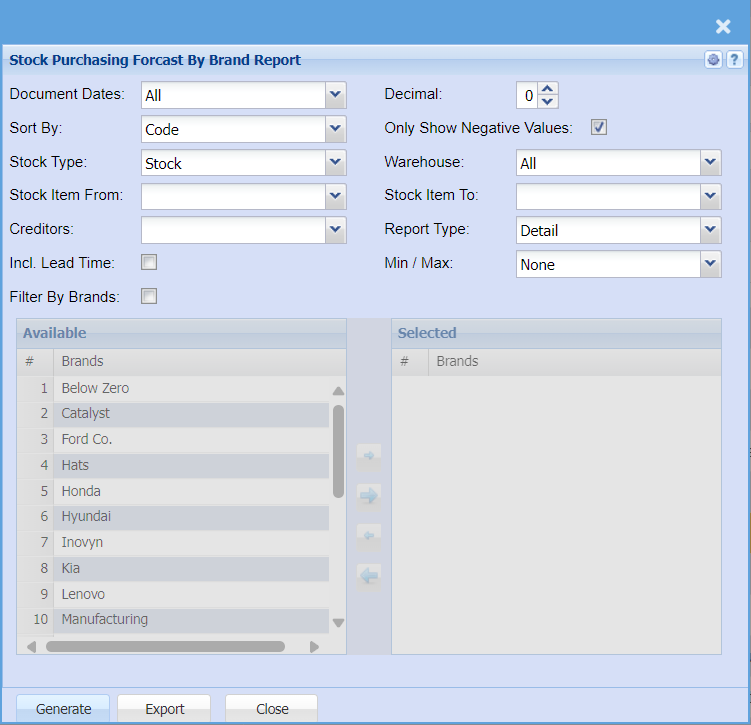
| Document Dates |
Select document days on the drop-down menu if you are wanting to pull this report for a specific date. Leave document selection on all if you want the report to show all document dates |
| Sort By | Sort the report by selecting one option from the drop-down menu allows the user to pull a report that will be sorted by either, Code, Description, Warehouse or Bin location. |
| Stock Type | Select from All, Stock, Service or Custom from the drop-down menu if you want to refine your Inventory report. |
| Stock Item From / To |
If you leave the stock item fields blank, all stock items will be displayed on the report If you choose specific stock items, the report will sort information by stock item code rather than description |
| Creditors |
Filter report by the supplier if you want to pull report by a specific supplier Leave this section black if you want to pull the report on all customers |
| Incl. Lead Time | Put a tick on if you wish to include lead time on the report |
| Filter By Brands |
Put a tick on if you want to filter the report by brands |
| Decimal |
It is advisable to set decimals to two places You can view the report with any number of decimal places. |
| Only Show Negative Values | Put a tick on if you only want to show negative values on the report |
| Warehouse |
Select the warehouse from the drop-down arrow If you leave the warehouse on all the report will pull on all warehouses |
| Stock Item To | Select the stock from and the stock to, for the report |
| Report Type |
Select report type or view type Select if you want to view the detailed version of the report or just the summary of the report |
| Min / Max | Select Min/Max on you want to run your report by or leave it on none if you do not wish to see the report by min/max |
| Generate Button |
Click the "Generate" button to open the report You will have options to copy, email, or print the report To view the report in an Excel document, copy the report and paste it into an Excel file |
| Export Button |
This allows you to export the report to Exel |