
Stock Count Sales Analysis
Inventory module> Reports> Reports List
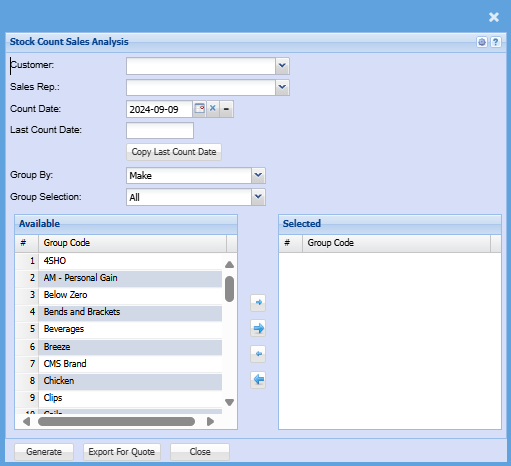
| Customer |
Select a customer you wish to filter the report by on the drop down menu selection If the customer/ debtor doesn't have any stock count under their name for the selected count date the generate and export for quote buttons will be greyed out |
| Sales Rep | Select a sales rep on the drop-down menu selection if applicable |
| Count Date | Select the count date |
| Last Count Date | Select the last count date |
| Copy Last Count Date | Copy last count date automatically fills the last stock count date for the selected customer/ debtor |
| Group By | Select a group you want to search by on the drop down menu selection |
| Group Selection | Select a group selection on the drop down and move group codes you wish to filter your report by to selected window |
| Generate |
Click the "Generate" button to open the report You will have options to copy, email, or print the report To view the report in an Excel document, copy the report and paste it into an Excel file |
| Export for Quote | Export for quote allows you to export the stock count to excel and to import as a quote without having to make any edits to the document |