
Inventory Valuation
Gives a report of all items cost, multiplied by quantity, to give the total value of stock. This can be given by warehouse, group codes and by various Work in Progress areas.
Inventory module> Reports> Reports List
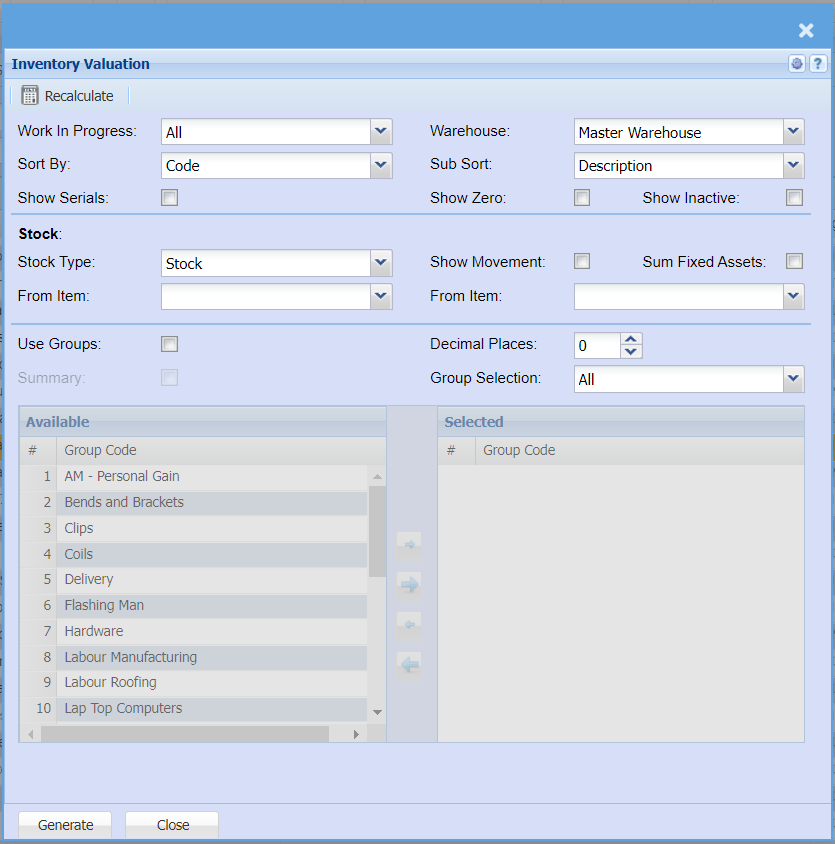
| Work In Progress (WIP) |
Select a work in progress document on the drop-down menu selection. If you leave it on ALL report will display all work in progress documents. |
| Sort By | Sort the report by selecting one option from the drop-down menu allows the user to pull a report that will be sorted by either, Code, Description, Warehouse or Bin location. |
| Show Serials | Put a tick on to show serial numbers on the report. |
| Warehouse |
If you select all warehouses the report will fetch data from all warehouses. If you want to search by a specific warehouse, select the warehouse from the menu. |
| Sub Sort |
Sub Sort the report by selecting one option from the drop-down menu allows the user to pull a report with a secondary criteria that will be sorted by either, Code, Description, Warehouse or Bin location. |
| Show Zero | Put a tick on to show zero quantities |
| Show Inactive | Put a tick on to show inactive items |
| Stock Type | Select the stock type you wish to filter the report by |
| From Item / To Item | From Item and to Item allows the user to select a stock item from where the report will start and the end. |
| Show Movement | Put a tick on to show movement |
| Sum Fixed Assets | Put a tick on to sum fixed assets |
| Use Groups | Put a tick on to be able to use group codes |
| Summary | When selecting this option, the report will only show the group code on hand and total |
| Decimal Places |
It is advisable to set decimals to two places You can view the report with any number of decimal places |
| Group Selection | Select a group selection on the drop down and move the group codes you wish to filter your report by to the selected window |
| Generate Button |
Click the "Generate" button to open the report You will have options to copy, email, or print the report To view the report in an Excel document, copy the report and paste it into an Excel file |